GPT Pages Importer for Obsidian
English · 繁體中文
Bring your Pages charts and interactions into Obsidian.
Complete HTML · Verified pairing · Automatic cleanup · Backup protection





Quick start ·
Workflows ·
Rendering and trust ·
Page authoring skill
---
Keep your ideas in Pages and bring their visualizations into Obsidian. GPT Pages Importer connects exported Markdown with complete, portable HTML sources: it verifies figure pairings, moves footer sources back to their chart positions, and removes verified markers and native image references.
> **Current release: [0.2.5](https://github.com/DLeungDL/obsidian-gpt-pages-importer/releases/tag/0.2.5).** Available in the [Obsidian Community directory](https://community.obsidian.md/plugins/gpt-pages-importer) and through manual installation. See the [compatibility record](docs/compatibility.md) for the actual scope of device testing. Interactive HTML requires the optional Polyglot Renderer and explicit user trust. On Obsidian 1.8.7 and later, the English, Traditional Chinese and Simplified Chinese interface follows Obsidian's language. Unsupported languages and older supported Obsidian versions use English; the minimum supported version remains 1.5.0.
## New in 0.2.5
- **More reliable MathBox exports:** the authoring skill embeds the complete matching MathBox CSS, including its license, in the exported HTML. Charts no longer depend on a separate stylesheet request.
- **JavaScript CDN fallback:** compatible, version-pinned Three.js, OrbitControls and MathBox scripts load from a primary CDN, then a backup if needed. Finite timeouts and clear failure messages replace indefinite loading. JavaScript dependencies still require network access and WebGL where used.
- **Update the skill too:** update the skill in your AI agent to generate charts with the improved template. Updating the Obsidian plugin alone does not rewrite existing Pages or exported HTML. Regenerate affected charts with the updated skill, then export and import again.
Earlier updates · 0.2.0–0.2.4
## New in 0.2.4
- **Formula cleanup fix:** automatic cleanup now accepts CommonMark spaces or tabs between a fence delimiter and `latex`, matching manual import. Exact backups, repeat processing and HTML trust behavior remain unchanged.
- **Export guidance:** the formula checklist now checks the bare `latex` blocks produced by the updated skill, before Obsidian delimiters are added during import.
## New in 0.2.3
- **Pages formulas in Obsidian:** convert complete standalone `latex` blocks containing bare TeX into native `$$` display math. Supports manual import and folder cleanup, including formula-only notes with HTML rendering off. Preview and cleanup summaries show the converted count; source backups and conflict protection remain in place.
- **Corrected math skill:** author Page formulas as bare `latex` blocks without dollar wrappers. Intentional source examples can use `tex`, `text` or `latex source`. Nested, unclosed, wrapped and recognized document/preamble blocks are preserved. [Math workflow and validation limits](skills/gpt-pages-obsidian-visualizations/references/math.md).
## New in 0.2.2
- **Visualization skill:** use Plotly.js by default for charts and MathBox for mathematical geometry and concept animations, with fixed-version CDN dependencies. New templates include loading/error states and adjustable controls. CDN-backed charts require network access; offline dependency checks remain optional.
- **Skill cleanup:** removed the obsolete `generate-portable-page` alias. Use `$gpt-pages-obsidian-visualizations` and update the skill in your AI agent separately from the Obsidian plugin. The new templates have automated static/mock coverage; fresh Pages and Obsidian runtime checks remain outstanding.
## New in 0.2.1
- **Simplified Chinese interface:** commands, import forms, previews, settings, renderer status and diagnostics now follow Obsidian’s 简体中文 setting. On Obsidian 1.8.7 or later, select 简体中文 and reload as prompted. The plugin recognizes `zh`, `zh-CN`, `zh-Hans` and `zh-SG`, alongside existing English and Traditional Chinese support.
## New in 0.2.0
- **Portable images:** restore PNG, JPEG, GIF and WebP from image source blocks included in a single Markdown export. Verified files are saved beside the note in `GPT Pages Assets/` and linked locally; matching images are reused on repeat imports. Supports manual import and folder cleanup, with limits of **1 MiB per image, 4 MiB total and 32 image source blocks**. [Image authoring and recovery guide](docs/images.md).
- **Cross-Page links:** the updated skill resolves internal Page links to tool-confirmed HTTPS destinations before export. These remain online links requiring access to the target Page; they do not become local notes. Unresolved links are preserved and reported. [Link preflight guide](skills/gpt-pages-obsidian-visualizations/references/page-links.md).
- **Math authoring:** the current source skill uses bare `latex` formula blocks for Pages and converts eligible blocks to Obsidian display math. This requires importer 0.2.3 or later; 0.2.2 and earlier retain these blocks as code. [Math workflow](skills/gpt-pages-obsidian-visualizations/references/math.md).
**Update the Obsidian plugin and your AI agent's skill separately.** Images and native math need neither HTML trust nor Polyglot Renderer. Manual tests passed for the linked-Page and multi-image examples. Formula rendering was checked in a corrected local note; an unmodified Page math export still needs separate end-to-end validation.
## Why use it?
| | Features |
| :--- | :--- |
| **Portable visuals** | Preserve complete HTML, CSS, JavaScript and data so interactive charts have portable source code. |
| **Compact pairing** | v3 uses short IDs in the body and keeps references and SHA-256 in the footer. Verified HTML returns to its chart position. |
| **Folder cleanup** | Watch one folder and all its subfolders. Add multiple Markdown exports for automatic cleanup in place. |
| **Protected writes** | Preview as plain text, back up before changes, skip identical imports and stop when local edits conflict. |
| **Explicit trust** | Manual imports default to `html-source`. Executable `html` requires explicit confirmation. |
| **AI authoring workflow** | Use the included skill to prepare export-ready Pages with paired HTML sources before importing. Includes templates, marker generators and an export-source verifier. |
## Quick start
You need three components for interactive charts:
| Component | Purpose |
| :--- | :--- |
| **Pages + authoring skill** | Prepare the Page with complete HTML, v3 pairing and portable sources before export. |
| **GPT Pages Importer** | Verify and restore the exported content in your Obsidian vault. |
| **Polyglot Renderer** | Render trusted interactive HTML. Not required for restored images or native math. |
### 1 · Use the authoring skill in your AI agent
**Prerequisite: enable and connect the [Pages plugin](https://chatgpt.com/plugins/plugin_connector_1p_4a72ddeef4c481918f92d8e8df18fb2c?open_in_app) in your AI agent, then select `@Pages`.** The agent needs Pages' read/write and native visualization tools. This skill requires Pages tools for creating or updating a Page; if they are unavailable or cannot access the target Page, resolve that dependency before continuing.
Add the complete [`skills/gpt-pages-obsidian-visualizations/`](skills/gpt-pages-obsidian-visualizations/) folder to your agent's skill library, including its scripts, references and assets. If your agent loads instructions from files, point it to the folder's [SKILL.md](skills/gpt-pages-obsidian-visualizations/SKILL.md) and keep the linked resources available. Use the skill with Pages to prepare the Page before exporting.
Install the skill helper's locked parser dependencies with `npm ci --ignore-scripts --prefix `. Its [cross-Page link preflight](skills/gpt-pages-obsidian-visualizations/references/page-links.md) replaces resolvable internal Page links with tool-confirmed HTTPS destinations before export, preserving labels and reporting unresolved targets. Links still require account access; the importer remains offline.
Ask the agent:
```text
Use @Pages and $gpt-pages-obsidian-visualizations to create or update a GPT Page about [your topic] for Markdown export to Obsidian. Use Pages tools to write the Page and create its native visualizations. Default to Plotly.js for charts and MathBox for mathematical animations, with fixed compatible CDN versions and explicit network requirements. Keep compact v3 ID-only markers in the body and matching complete HTML sources, dependency URLs, native references and SHA-256 in the footer. Do not fall back to v2.
Include portable image source blocks for any images, resolve cross-Page links before export, and use standalone latex blocks containing bare TeX formulas, with no dollar wrappers. Confirm that the installed importer supports converting them to Obsidian math.
```
The skill prepares native charts, short figure IDs and footer HTML with matching references and SHA-256 checksums. This is the required authoring step in this workflow: a normal Page export may contain only native image references, which do not carry portable HTML. The importer cannot reconstruct missing sources. The skill runs in your AI agent; GPT Pages Importer handles the resulting Markdown in Obsidian.
From 0.1.6, the skill and its generator require v3, even if the target importer version is unknown. The importer still supports older v1/v2 exports. Ordinary Pages keep `html` source fences; for an automatic-cleanup trust test, use a separate `html-source` Markdown copy with identical HTML bytes and checksums. Confirm folder trust and select **Save settings** before testing conversion. Update the skill folder in your agent separately from the Obsidian plugin.
### 2 · Install the plugin
Open the [Obsidian Community listing](https://community.obsidian.md/plugins/gpt-pages-importer), select **Add to Obsidian**, and install and enable **GPT Pages Importer** in Obsidian.
For manual installation, download `main.js`, `manifest.json` and `styles.css` from [GitHub Releases](https://github.com/DLeungDL/obsidian-gpt-pages-importer/releases/latest). Create the plugin folder and place those three files in:
```text
your vault/
└── .obsidian/
└── plugins/
└── gpt-pages-importer/
├── main.js
├── manifest.json
└── styles.css
```
License and third-party notices are embedded in `main.js`. Enable the plugin under **Settings → Community plugins**. Reload it after replacing files for a manual update.
Build from source
Requires **Node.js 24** and npm:
```sh
git clone https://github.com/DLeungDL/obsidian-gpt-pages-importer.git
cd obsidian-gpt-pages-importer
npm ci
npm run check
```
Copy `dist/gpt-pages-importer/` into your vault's `.obsidian/plugins/` directory. You can also download the `gpt-pages-importer` build artifact from a successful [GitHub Actions run](https://github.com/DLeungDL/obsidian-gpt-pages-importer/actions/workflows/check.yml).
### 3 · Export the prepared Page
1. Open the skill-prepared Page and click the page title menu in the upper-left corner.
2. Select **Download**, marked by the red arrow below, to save the Page as a Markdown (`.md`) file.
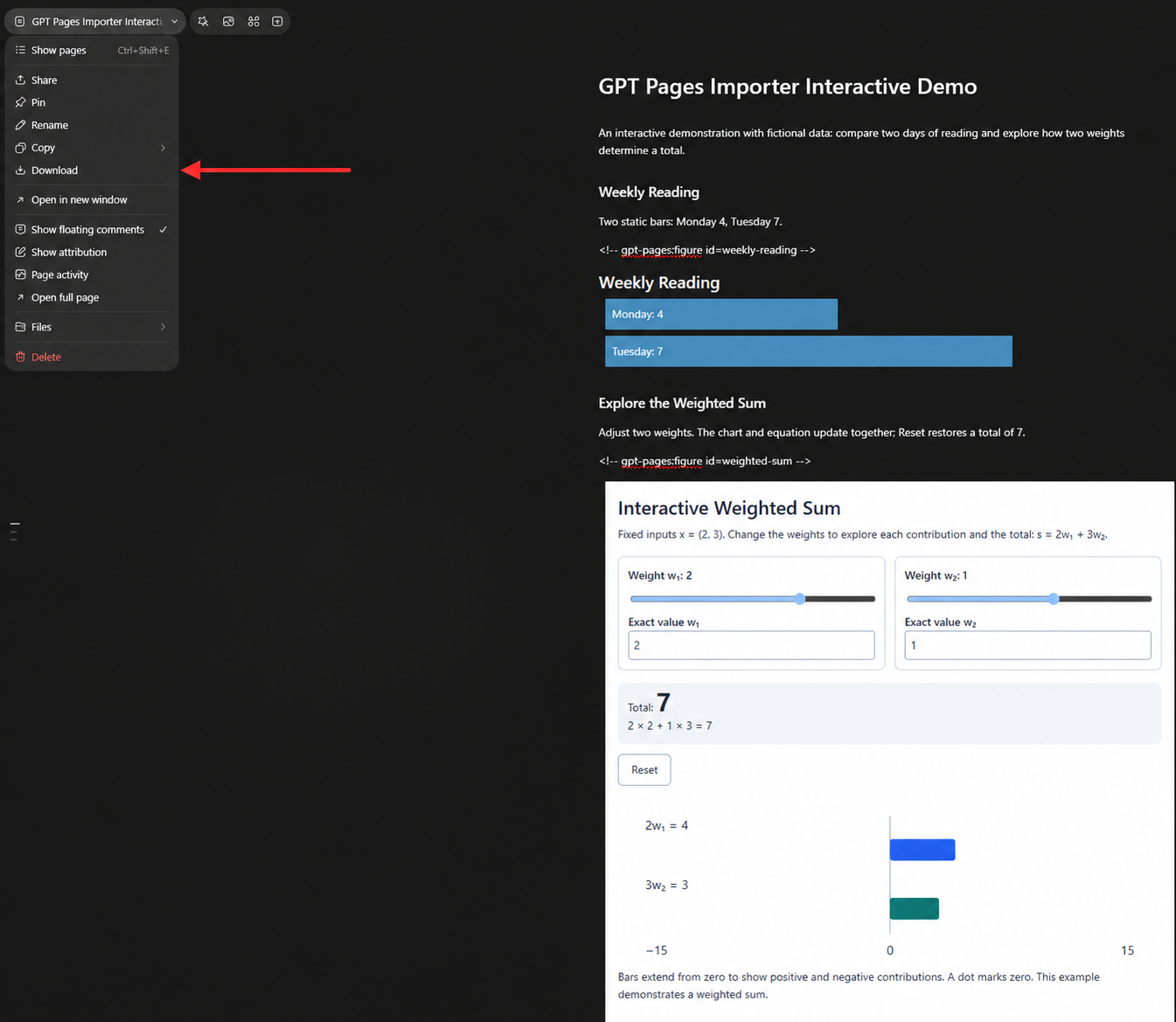
Confirm that the downloaded Markdown includes the figure markers and each visualization's complete fenced `html` source in the footer. If any source is missing, ask the agent to correct the Page using the skill, then export again.
For images, also check that the export includes `gpt-pages-asset` source blocks: native image references alone do not contain image bytes. For formulas, confirm that the export contains complete standalone `latex` blocks with bare TeX and no dollar wrappers; the importer adds the Obsidian math delimiters. Validate the actual exported file before enabling HTML rendering.
### 4 · Import your first note
1. Run **GPT Pages Importer: Import Pages Markdown**, then select or drop a file.
2. Review the destination, verified figure count and warnings in the text-only preview.
3. Confirm the import. The destination note opens automatically.
When importing the same Page again, reuse its source name. The default destination for a new source is `GPT Pages/`; later imports reuse the saved destination. See the [detailed usage guide](docs/usage.md) for other entry points, re-imports and recovery.
To use interactive charts, install Polyglot Renderer, inspect the HTML and explicitly confirm trust as described under [Rendering and trust](#rendering-and-trust).
## Import or automatic cleanup
| | Manual import | Automatic folder cleanup |
| :--- | :--- | :--- |
| **Best for** | Previewing before creating or updating a destination note | Dropping a batch of exports into a watched folder |
| **Location** | Creates a destination under `GPT Pages/` by default | Modifies the original file, preserving its path and name |
| **Repeat processing** | Skips identical content and stops on conflicting local edits | Skips unchanged content without creating another backup |
| **HTML fences** | Defaults to `html-source`; trusted imports can use `html` | Preserves existing fence languages by default; folder rendering trust is optional |
| **Backups** | Before replacing an existing destination | Before each modification in place |
In the plugin settings, enter an existing vault folder under **Watched folder**. Turn on **Enable automatic cleanup** and select **Save settings**. Saving and enabling scans existing Markdown and then handles files added, modified or moved into the folder or any subfolder.
Cleanup removes only verified figure markers and native image references. A verified footer source moves to its original figure position. Backups and destination notes tracked by the manual importer are excluded. Cleanup backups are stored under `GPT Pages Backups/cleanup`. See the [settings and trust guide](docs/usage.md#automatic-folder-cleanup) for details.
## From Page to note
```mermaid
flowchart LR
A["Pages
Native visuals + short figure IDs"] --> B["Markdown export
Body markers + complete footer HTML"]
B --> C["Verify pairing
ID · reference · SHA-256"]
C --> D["Obsidian
HTML returns to each chart position"]
```
The importer reads HTML from the exported Markdown. It removes a figure's marker and native image reference only when its unique ID, exact reference, complete source and SHA-256 all verify. Ambiguous pairings stay unchanged and produce warnings. Older v1 and v2 formats remain supported.
[Read the pairing contract →](docs/format.md) · [English authoring format reference →](skills/gpt-pages-obsidian-visualizations/references/export-format.md)
## Rendering and trust
Manual imports keep HTML in `html-source` fences by default. For interactive rendering, inspect the source, explicitly trust it, and use the separately installed [Polyglot Renderer](https://github.com/Nimaapr/polyglot-renderer) to render `html` fences.
The import dialog and the cleanup HTML rendering option show whether Polyglot Renderer is not installed, disabled or enabled. Use **Recheck renderer** (繁體中文: **重新檢查 renderer**) after installing or changing its enablement. Detection reads this vault's installation files and saved enabled-plugin list; it does not verify successful loading or renderer settings. Unreadable or incomplete configuration shows "Unable to determine". Status checks never grant trust, install or enable plugins, or block importing and cleanup.
- Manual import trust covers **all HTML blocks in the document**.
- Folder trust covers **all current and future HTML blocks in the folder and its subfolders**, including unpaired blocks.
- Automatic cleanup preserves existing fence languages by default. Disabling rendering stops future conversions; it does not revert existing `html` blocks.
- Changes are backed up before writing. Trusted JavaScript may execute and make network requests. A matching SHA-256 establishes source consistency, not code safety.
To enable rendering after cleanup, turn on **Enable HTML rendering after cleanup** , read and confirm the folder trust dialog, then save settings. Changing the watched folder requires confirming trust again. The importer does not install or enable a renderer automatically.
[Rendering options, backups and recovery →](docs/usage.md)
## Privacy and access
The plugin is free, requires no account, payment or API key, collects no telemetry and sends no network requests. Manual import reads the external Markdown file you select through the file picker. Writes stay within the current vault: destination notes, backups and plugin settings. Automatic cleanup processes only the configured vault folder and its subfolders.
HTML rendering is provided by the separately installed Polyglot Renderer. If trusted HTML or JavaScript includes external images, fonts, libraries or requests, the renderer may contact those services. Inspect the complete source before enabling trust.
The importer does not download Page assets or provide cloud or bidirectional sync. Since 0.2.0, [portable image support](docs/images.md) lets the authoring skill include original PNG/JPEG/GIF/WebP bytes as Base64 in a single Markdown file. Verified images are saved beside the note in `GPT Pages Assets/` and linked locally. This requires explicit `gpt-pages-asset` sources; plain native image references cannot be reconstructed. Limits and recovery behavior are documented in the linked contract.
## Documentation and resources
The guides and examples below default to English. Each includes a link to its Traditional Chinese version.
| Task | Resource |
| :--- | :--- |
| Installation, importing, watched folders, re-imports and recovery | [Detailed usage guide](docs/usage.md) |
| v3, v2 and v1 pairing rules | [Format contract](docs/format.md) |
| Author portable Pages for Obsidian | [English skill and tools](skills/gpt-pages-obsidian-visualizations/SKILL.md) · [English format reference](skills/gpt-pages-obsidian-visualizations/references/export-format.md) |
| Check validation scope | [Compatibility record](docs/compatibility.md) · [Round-trip evidence summary](docs/pages-roundtrip.md) |
| Try authored sample data | [Static example](examples/static.md) · [Interactive example](examples/interactive.md) |
| Prepare images, Page links and formulas | [Portable images](docs/images.md) · [Cross-Page links](skills/gpt-pages-obsidian-visualizations/references/page-links.md) · [Math example](skills/gpt-pages-obsidian-visualizations/assets/math-example.md) |
| Report a bug or request a feature | [GitHub Issues](https://github.com/DLeungDL/obsidian-gpt-pages-importer/issues) |
## Community and feedback
Share your experience in the [Obsidian Forum showcase topic](https://forum.obsidian.md/t/gpt-pages-importer-bring-pages-charts-and-interactive-html-into-obsidian-feedback-welcome/119527/3). Feedback on skill setup, first imports, repeat image imports and folder trust is especially useful. A Simplified Chinese introduction has also been submitted to the Chinese forum and is awaiting moderator approval.
For reproducible bugs, [open a GitHub issue](https://github.com/DLeungDL/obsidian-gpt-pages-importer/issues) with your OS, Obsidian/plugin/renderer versions, reproduction steps and a small sanitized sample. Keep private Pages and personal data out of public reports.
## Development
```sh
npm run typecheck # Strict TypeScript
npm run build # Bundle, package and smoke-test loading
npm test # Vitest regression tests
npm run check # Public-data check + build + tests
```
The skill's Python verifier also has standard-library tests:
```sh
python -B -m unittest discover -s tests -p 'test_skill_export.py' -v
```
Conversion logic lives in [src/convert.ts](src/convert.ts), importing and conflict protection in [src/importer.ts](src/importer.ts), and automatic cleanup in [src/cleanup.ts](src/cleanup.ts). Public fixtures use fictional identifiers. Private Pages, original exports and screenshots stay outside Git.
FAQ
### Why do I only have native image references, without portable interactive charts?
A `visualize:` reference does not contain complete HTML. Use the [authoring skill](skills/gpt-pages-obsidian-visualizations/SKILL.md) to include matching sources in the Page footer before exporting Markdown.
### Can I process multiple documents at once?
Place multiple Markdown files into the watched folder or its subfolders for automatic cleanup. The manual import dialog accepts one file at a time.
### Does the plugin download from Pages or sync automatically?
Import and cleanup use Markdown you provide. They do not connect to Pages to download attachments or offer cloud or bidirectional sync.
## Support development
Enjoying GPT Pages Importer?
Your support helps with maintenance, compatibility, documentation and examples.

Always free and open source. Support is entirely optional. Thank you!
## License
This project uses the [MIT License](LICENSE), covering the plugin source, documentation and bundled Page authoring skill. Bundled dependencies retain their own licenses. Complete third-party notices are embedded in `main.js`; source builds and CI installation artifacts also include readable license files.