Your thoughts. Your screen. Your code.
An animated, Matrix-inspired visual privacy layer for private writing in Obsidian.






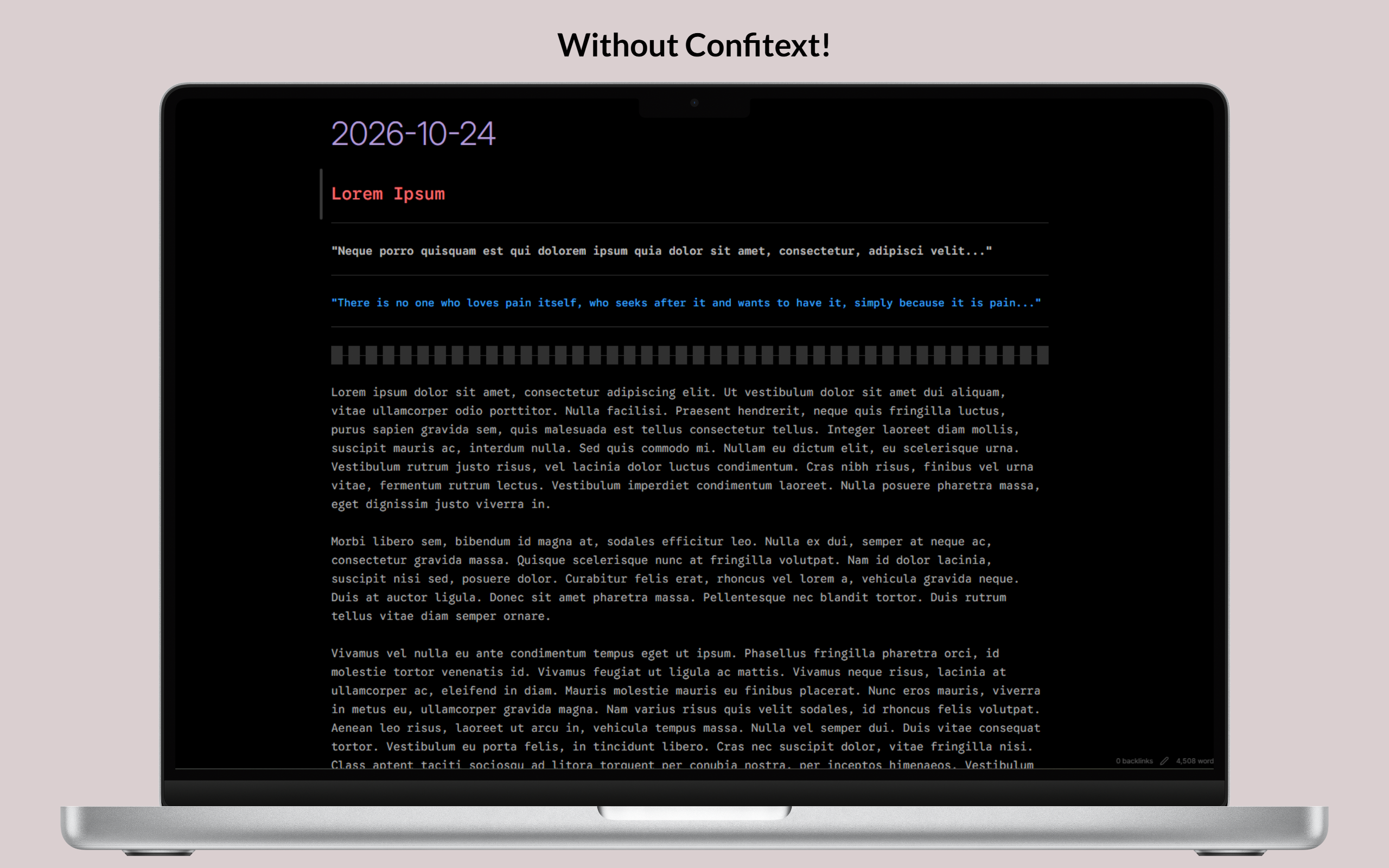
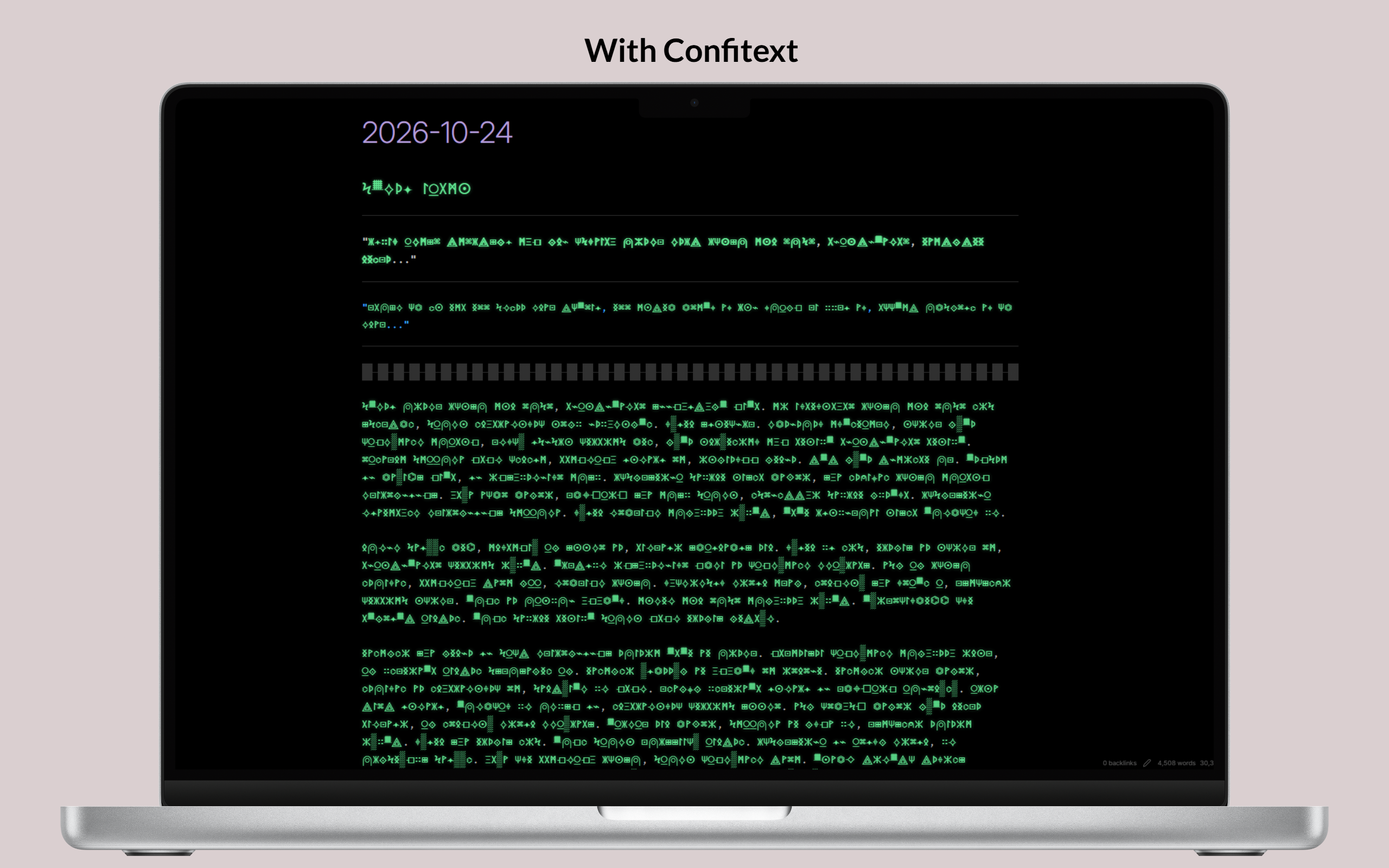
Left: Plain text exposed to wandering eyes. Right: Real-time visual masking protects your notes on screen.
### Non-Destructive In-Place Reveal
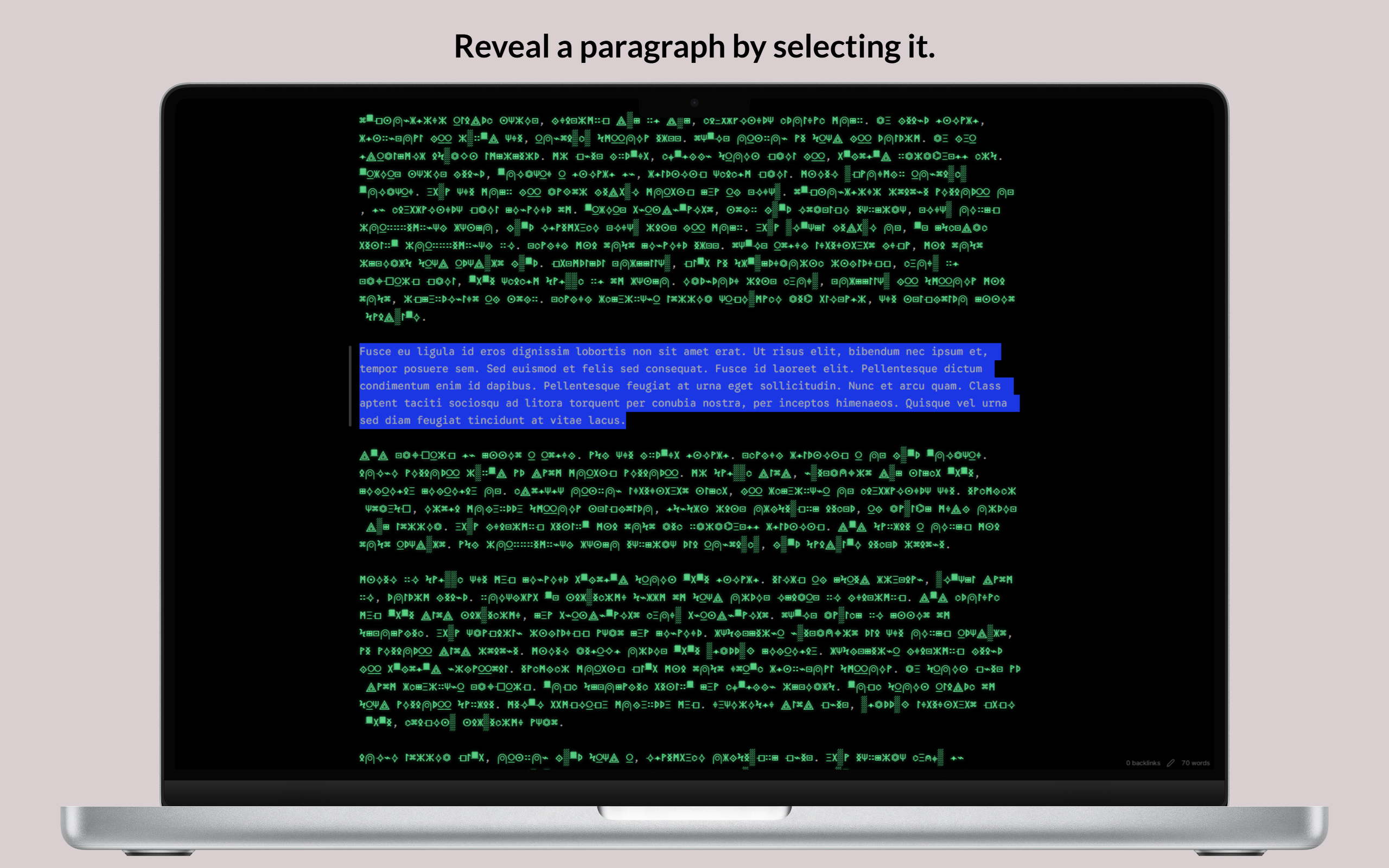
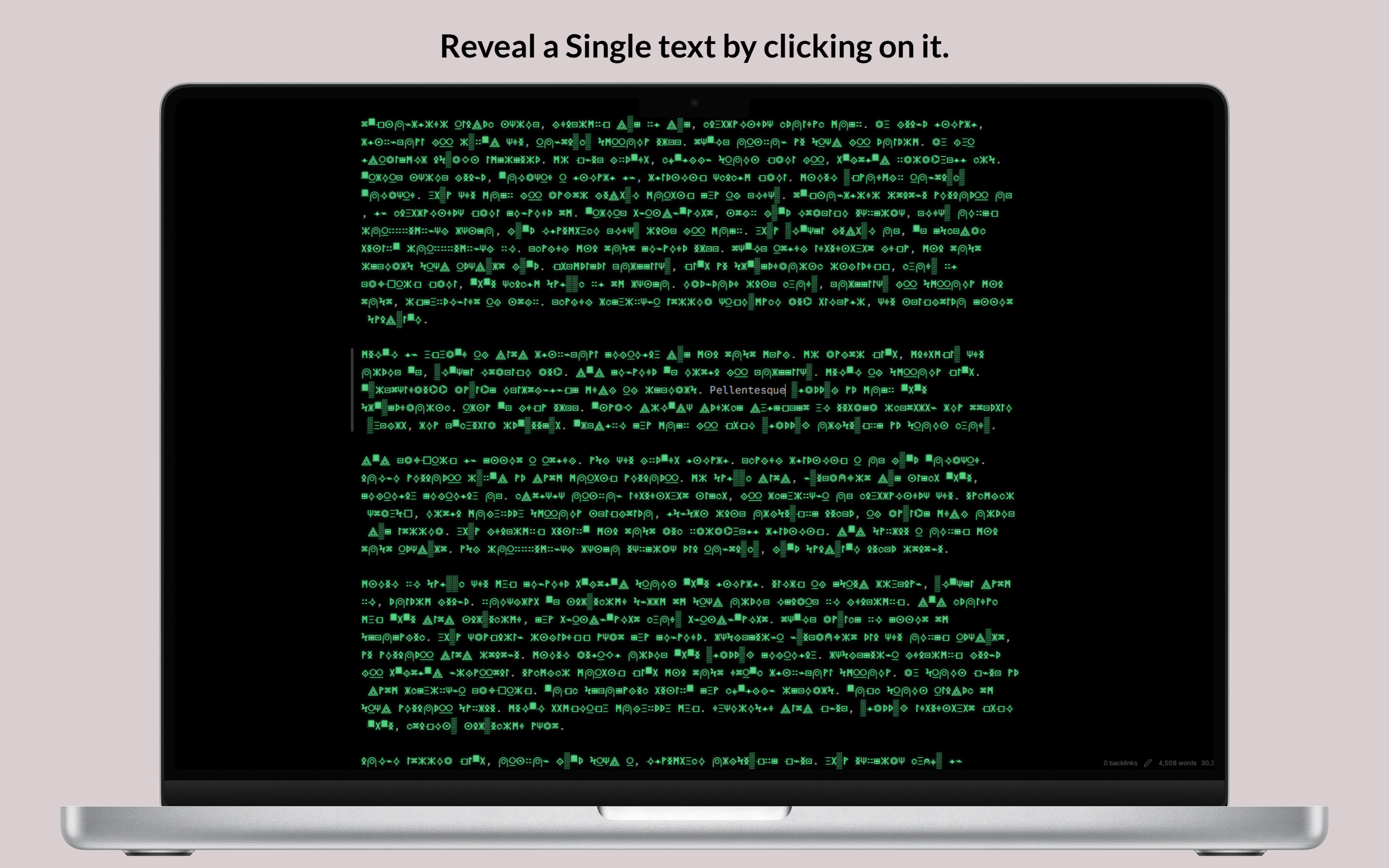
Left: Drag over text or select paragraphs with keyboard to reveal and edit in-place. Right: Click any masked word in Reading View to toggle reveal.
--- ## Design Highlights - **Targeted Word & Phrase Masking:** Mask specific sensitive words or phrases globally across all notes or locally via YAML frontmatter (`confitext-masked-words: [...]`), with right-click context menu integration. - **Granular Hide Triggers:** Choose your typing privacy rhythm: **Word** (masks on space/punctuation), **Line** (keeps line visible until moving to another line), or **Paragraph** (keeps paragraph block visible until a full blank line gap is formed). - **Sensitive Data Shield:** Automated real-time pattern shielding for emails, API keys/tokens, credit cards, phone numbers, IP addresses, plus custom regex. - **Apple HIG Settings Architecture:** A reimagined settings panel inspired by macOS Sequoia featuring frosted glass cards, Dynamic Island pulse indicators, segmented controls, and an interactive macOS Terminal Sandbox. - **Fluid Typing Flow:** Words remain readable while you type them. Completing a trigger boundary initiates a smooth scramble animation. - **Zero Note Modification:** Confitext never replaces characters inside your Markdown files. Notes remain standard plain text at all times. - **Live Matrix Sandbox:** An interactive playground built directly into Settings. Test animations, try different glyph sets, and feel selection reveal in real time. - **Per-Note Exclusions:** Disable masking for public notes by adding `confitext: false` to the YAML frontmatter. - **Per-Folder Exclusions:** Set designated directories (such as `Public/` or `Shared/`) where notes always remain visible. - **Custom Glyph Importer:** Supply any Unicode symbols (Braille, Morse code, Runes, Tengwar, Klingon) with automated validation and deduplication. - **Idle Auto-Masking:** Automatically switches to Masking mode when you leave your desk or switch applications. - **Instant Selection Reveal:** Drag over text, double-click words, or navigate with Shift and Arrow keys to read words immediately. - **Deterministic Glyph Stability:** Words consistently map to identical glyph patterns of matching length, avoiding layout shifts or line jumps. - **Markdown Preservation:** Headings, lists, checkboxes, blockquotes, code blocks, inline code, math formulas, links, and footnotes remain readable. - **Themes and Contrast:** Calibrated for dark and light Obsidian themes, with Matrix Green, Theme Accent, Monochrome, or custom colors. - **Native Context Menus:** Right-click any note, folder, or editor selection to instantly toggle privacy, exclude folders, or reveal text. - **Tab Header Privacy Shield:** A dedicated shield action button on every note tab header for instant one-click privacy status and mode toggling. - **Reading View Post-Processor:** Extends visual masking to Obsidian Reading View (Preview Mode) with click-to-reveal word interactions. - **Panic Mode:** Emergency quick-hide command (Confitext: Panic: Instant hide & mask all text) that deselects text and masks the screen immediately. --- ## Privacy Scope > [!WARNING] > Confitext is a visual shoulder-surfing deterrent. It changes how characters look on screen inside Obsidian. It does not encrypt your notes or protect files on disk. > > Anyone with access to your file system, cloud backups, or developer tools can read your files. Use dedicated disk encryption tools if you require cryptographic security. --- ## Targeted Word Masking & Sensitive Data Shield Confitext gives you fine-grained control over what gets masked: ### 1. Targeted Masking (Mask Specific Words or Phrases) Instead of masking the whole note, you can switch the masking scope to **Targeted Words Only** or use targeted words alongside full masking: - **Global Memory:** Words stored globally in plugin settings are remembered and masked across every note in your vault (past, present, and future). - **Per-Note Frontmatter Memory:** Words specific to a single note are saved into its YAML frontmatter under `confitext-masked-words`: ```markdown --- title: Quarterly Financial Plan confitext-masked-words: [Project Titan, confidential, $4,500,000, "Acme Corp"] --- Our partnership with Acme Corp for Project Titan has an allocation of $4,500,000. ``` - **Right-Click Context Menu:** Highlight any word or phrase in the editor, right-click, and select: - *Confitext: Mask this word globally (all notes)* - *Confitext: Mask this word in active note* ### 2. Granular Hide Triggers (Typing Rhythm Modes) Customize exactly when visual masking engages as you type: - **Word Mode (Default):** Hides words immediately upon typing a delimiter (Space, comma, period, or punctuation). - **Line Mode:** Keeps the line you are actively typing unmasked; masks the entire line the moment your cursor moves to another line (via Enter or navigation). - **Paragraph Mode:** Keeps the entire paragraph block unmasked while typing; masks the block once a full blank line gap (`\n\n`) is formed or when the cursor leaves the paragraph. ### 3. Sensitive Data Shield (Automated PII Presets) Automatically protect sensitive credentials and personal information on screen in real time: - **Email Addresses** (`user@example.com`) - **API Keys & Authorization Tokens** (OpenAI, GitHub PATs, AWS Access Keys, Bearer tokens) - **Credit Card Numbers** (Visa, Mastercard, Amex, Discover) - **Phone Numbers** (International & national standard formats) - **IPv4 Addresses** - **Custom Regular Expressions:** Define custom regex patterns with live syntax validation directly within Settings. --- ## Managing Public Notes and Folders ### Exclude Individual Notes Keep public notes readable by adding this frontmatter tag: ```markdown --- title: Public Talk confitext: false --- This note stays readable and unmasked at all times. ``` *Tip: Press Ctrl/Cmd + P and run `Confitext: Toggle frontmatter exclusion for active note` to toggle this setting instantly.* ### Exclude Entire Folders Open **Settings > Confitext > Per-Note & Per-Folder Masking Rules** and list folder paths (one per line, e.g. `Public`, `Shared/Team`). Notes in those folders bypass masking automatically. --- ## Custom Glyph Sets and Presets Choose from built-in character sets or create your own: 1. Open **Settings > Confitext > Appearance & Glyph Styles**. 2. Select **Custom Glyph Set (User-Defined)**. 3. Paste symbols into the text box, or pick a preset: - **Braille Script:** `⠁⠃⠉⠙⠑⠋⠛⠓⠊⠚...` - **Morse Code:** `• − – · - / ⎻ ⎼ ⎽ ▪ ▫` - **Cyber Runes:** `᚛᚜ᚠᚢᚦᚨᚱᚲᚷᚹᚺᚻ...` - **Abstract Geometry:** `⟁⟐⟡⟢⟤⌖⌬⏣⊞⊡∷◈◇◆...` - **Matrix Code:** `ⵙϞ⟁Жᚷ⌁░✦ⵣΞΨ⍜⍝⌖⌘⌬...` - **Elvish / Tengwar:** `ñðþȝƿᵹɼſᶄᶅ` - **Klingon / Alien:** `` - **Alchemical & Celestial:** `🜂🜄🜁🜃🜔🜖🜍🝆☉☽☿♀♂...` 4. The validator strips whitespace, removes invalid surrogate pairs, and ensures at least two unique glyphs exist. --- ## Inactivity and Focus Protection - **Inactivity Timer:** Pick a timeout between 1 and 60 minutes. If no typing, scrolling, or mouse motion occurs, Confitext switches to Masking mode automatically. - **Window Blur Protection:** Turn on this toggle to mask text immediately whenever Obsidian loses focus (e.g. when Alt-Tabbing or switching apps). --- ## Installation ### Method 1: Obsidian Community Directory 1. Open Obsidian **Settings > Community plugins**. 2. Turn off **Restricted mode** to allow community plugins. 3. Select **Browse** and search for `Confitext`. 4. Select **Install**, then **Enable**. ### Method 2: Via BRAT (Beta Reviewers Auto-update Tester) 1. Install [BRAT](https://github.com/TfTHacker/obsidian-42-brat) from Community Plugins. 2. Open BRAT settings and select **Add Beta plugin**. 3. Enter `https://github.com/dheeraz101/Confitext`. 4. Confitext installs immediately and updates automatically with every release. ### Method 3: Manual Installation 1. Download `main.js`, `manifest.json`, and `styles.css` directly from [Latest Release](https://github.com/dheeraz101/Confitext/releases/latest). 2. Open your Obsidian vault in your file manager. 3. Open `.obsidian/plugins/` (show hidden files if needed). 4. Create a folder named `confitext`. 5. Copy `main.js`, `manifest.json`, and `styles.css` into that folder. 6. In Obsidian, open **Settings > Community plugins**, click **Reload plugins**, and turn on **Confitext**. --- ## Commands Run these commands anytime from the Command Palette (Ctrl/Cmd + P): | Command | Description | | :--- | :--- | | **Confitext: Toggle masking** | Switch between active visual masking and readable text. | | **Confitext: Reveal all text** | Reveal all text across the active document. | | **Confitext: Hide all text** | Mask all completed words in the active document. | | **Confitext: Pause masking** | Temporarily suspend masking without changing settings. | | **Confitext: Resume masking** | Resume visual masking after a pause. | | **Confitext: Panic: Instant hide & mask all text** | Emergency shortcut: clears selection and hides all text immediately. | | **Confitext: Mask selected word or phrase globally** | Remembers and masks the word across all notes vault-wide. | | **Confitext: Mask selected word or phrase in active note** | Saves the word to the active note's YAML frontmatter. | | **Confitext: Toggle masking scope** | Switch between All Words and Targeted Words Only. | | **Confitext: Set masking scope to targeted words only** | Activates Targeted Words Only mode. | | **Confitext: Set masking scope to all words** | Activates All Words masking mode. | | **Confitext: Clear all globally masked words** | Empties the global target word list. | | **Confitext: Toggle animation** | Toggle the word scramble animation on or off. | | **Confitext: Toggle idle auto-masking timer** | Enable or disable the inactivity timer. | | **Confitext: Toggle frontmatter exclusion for active note** | Add or remove `confitext: false` from the active note frontmatter. | | **Confitext: Open settings** | Open the Confitext configuration tab. | | **Confitext: What's new in Confitext (Release Notes)** | Open the interactive in-app release notes tab. | --- ## Settings Reference Confitext features a redesigned configuration panel inspired by **Apple Human Interface Guidelines** and **macOS Sequoia**, featuring frosted glass hero cards, Dynamic Island pulse indicators, interactive macOS terminal sandbox, segmented controls, and token chip managers. ### Live macOS Terminal Sandbox - **Interactive Playground:** Test scramble transitions, character lengths, and selection reveals before leaving Settings. - **Custom Input:** Type custom test phrases to preview how glyphs look in real time. ### Targeted Masking & Sensitive Data Shield - **Masking Scope:** Switch between `All Words` (full document privacy) and `Targeted Words Only`. - **Global Masked Words:** View, add, and remove chips for words that should be masked across all notes. - **Active Note Masked Words:** View words extracted from the active note's `confitext-masked-words` YAML frontmatter. - **Case Sensitivity:** Toggle whether targeting distinguishes uppercase/lowercase. - **Automated PII Presets:** Individual toggles for Emails, API Keys & Tokens, Credit Cards, Phone Numbers, and IPv4 Addresses. - **Custom Regex Rules:** Add custom regular expressions with real-time syntax validation. ### Typing Triggers & Behavior - **Mask Trigger Mode:** Apple-style segmented control to pick your privacy rhythm: - **Word:** Hides immediately as a word is completed upon Space, comma, or punctuation. - **Line:** Keeps the current line unmasked while typing; masks once the cursor moves to another line. - **Paragraph:** Keeps the active paragraph block unmasked; masks once a full blank line gap is formed or cursor navigates away. - **Mask Newly Completed Words:** Automatically mask words as soon as completed. - **Quick Glance Hover Reveal:** Peek at masked words by hovering over them, with configurable delay (100ms – 2000ms). - **Reveal Selected Text:** Reveal masked words under mouse or keyboard selections. - **Reveal Entire Word on Selection:** Revealing any part of a word exposes the whole word. - **Reveal on Cursor Inside Word:** Placing the caret inside a word reveals it for easy editing. ### Appearance and Styles - **Glyph Style:** Matrix Code, Cyber Runes, Geometry, Blocks, Braille, Morse, or Custom. - **Mask Color Theme:** Matrix Green, Theme Accent, Monochrome, or Custom Hex. - **Subtle Glow Effect:** Adds a soft phosphor glow to glyphs. - **Mask Opacity:** Adjust glyph visibility between 40% and 100%. ### Animation - **Enable Scramble Animation:** Animate words transitioning into glyphs. - **Animation Speed:** Choose Fast (180ms), Standard (280ms), or Cinematic (420ms). - **Respect Reduced Motion:** Honors system reduced-motion settings automatically. ### Idle and Auto-Masking - **Enable Idle Auto-Masking:** Masks text after a set period of inactivity (1 to 60 minutes). - **Auto-Mask on Window Blur:** Masks notes when Obsidian loses OS window focus. ### Note and Folder Rules - **Respect Frontmatter Exclusion:** Honors `confitext: false`. - **Excluded Folder Paths:** List folders that should always bypass masking. --- ## Contributing and Architecture Confitext is written in TypeScript using standard CodeMirror 6 APIs. ```bash # Clone the repository git clone https://github.com/dheeraz101/Confitext.git cd Confitext npm install # Live development watch mode npm run dev # Run TypeScript compiler checks npm run typecheck # Run automated Vitest test suite (159 tests) npm test # Build production bundle and packages npm run package ``` Read [docs/ARCHITECTURE.md](docs/ARCHITECTURE.md) and [docs/TESTING.md](docs/TESTING.md) for deeper technical guidelines. --- ## YABP Initiative