# Bases Colors
Color the cards and rows in Obsidian **Bases** by due date or by any property, show how long until each task is due, add your own badges (like ❗️ for high priority), and give property values like clients or owners their own colors. Works in Kanban, Cards, Table and List views.
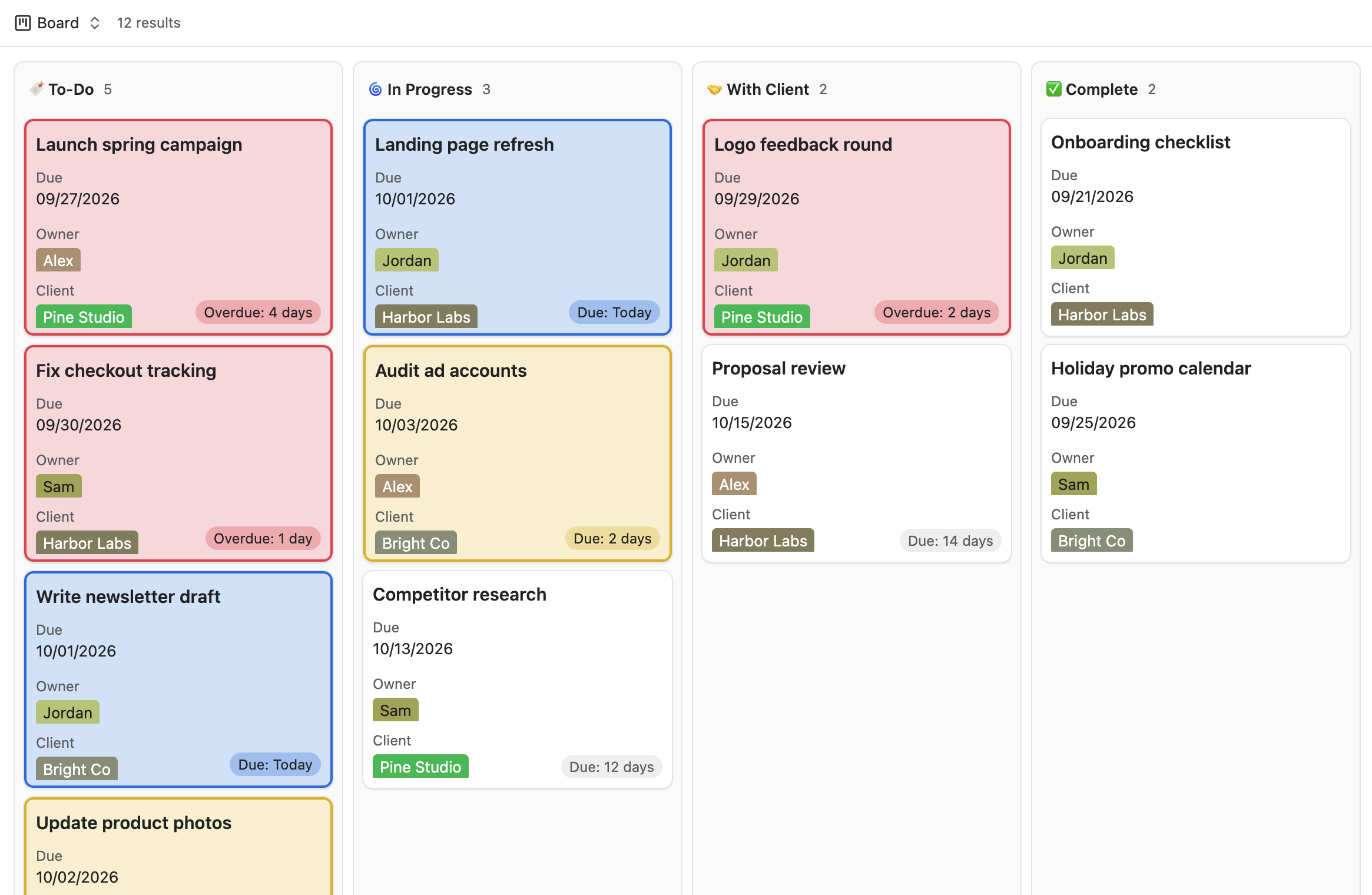
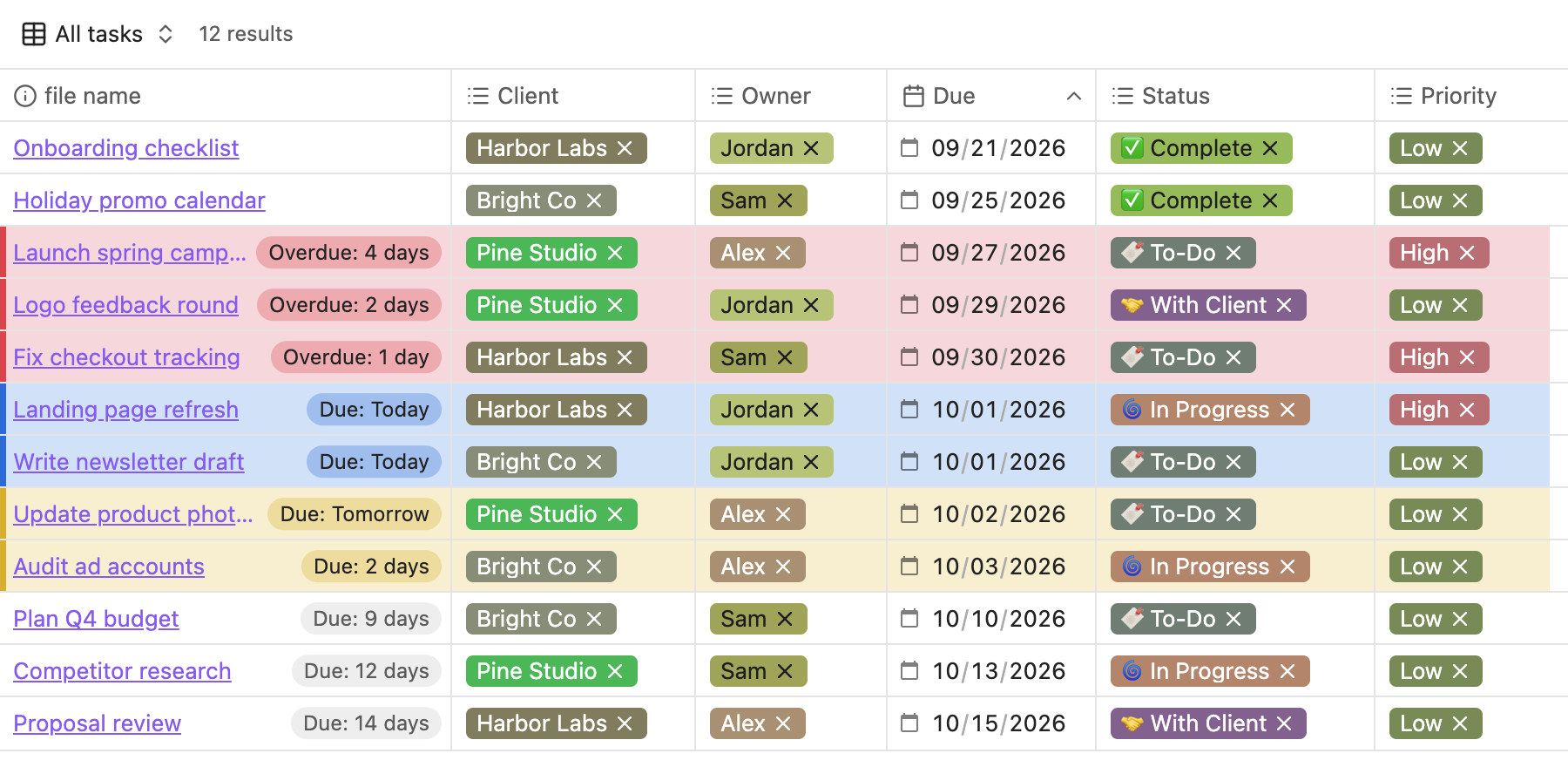
*Colors in these screenshots: red for overdue, blue for due today, yellow for due soon. You can pick any colors.*
## Features
### Card/row colors
- **Due-date colors.** Cards/rows turn red when overdue, orange when due today, and yellow when due soon (you choose how many days counts as "soon"). Each color can be changed or turned off.
- **Rules by property.** Color cards/rows by any property, for example `Rating is 5` → green, `Read is unread` → blue, `Owner is Kate` → purple. Rules are checked top to bottom and the first match wins.
- **Filter.** Limit which cards/rows can be colored, for example only tasks whose Status is To-Do, In Progress or With Client, so finished work stays plain.
- **Any view type.** Choose which views get colors: Kanban, Cards, Table and List.
- **Per-base control.** Apply due-date colors or individual rules only to specific bases.
- **Highlight styles.** Tint, border only, or a left stripe, with an adjustable tint strength.
### Badges
Small pills in the corner of each card (or at the end of each table row).
- **Due date badge.** "Due: 8 days", "Due: Tomorrow", "Due: Today", "Overdue: 3 days".
- **Custom badges.** Show your own text or emoji when a property matches, for example `Priority is High` → ❗️, or `Status is Waiting` → ⏳. Each badge can be plain or colored.
### Property/tag colors
- **Automatic colors.** Every property value (like a client or owner) gets its own color, always the same for the same value.
- **Custom colors.** Pick a color for any value, for one property or for all of them.
- **Everywhere.** Values are colored in every Bases view and, optionally, in the Properties panel at the top of notes.
### Color picker
- **Theme colors** in four tones (Vibrant, Muted, Pastel, Deep) that follow your theme and light/dark mode.
- **Distinct** colors from the Okabe-Ito palette, chosen to stay easy to tell apart, including for color blindness.
- **Custom** for any color you like.
### Quick toggle
A command, "Turn card/row coloring on or off", that you can bind to a hotkey.
## Requirements
- Obsidian 1.14 or later (the version that added the Kanban view to Bases).
- The file name must be shown on each card/row (as the card title, or as a column in tables). The plugin uses it to match each card/row to its note.
## Settings
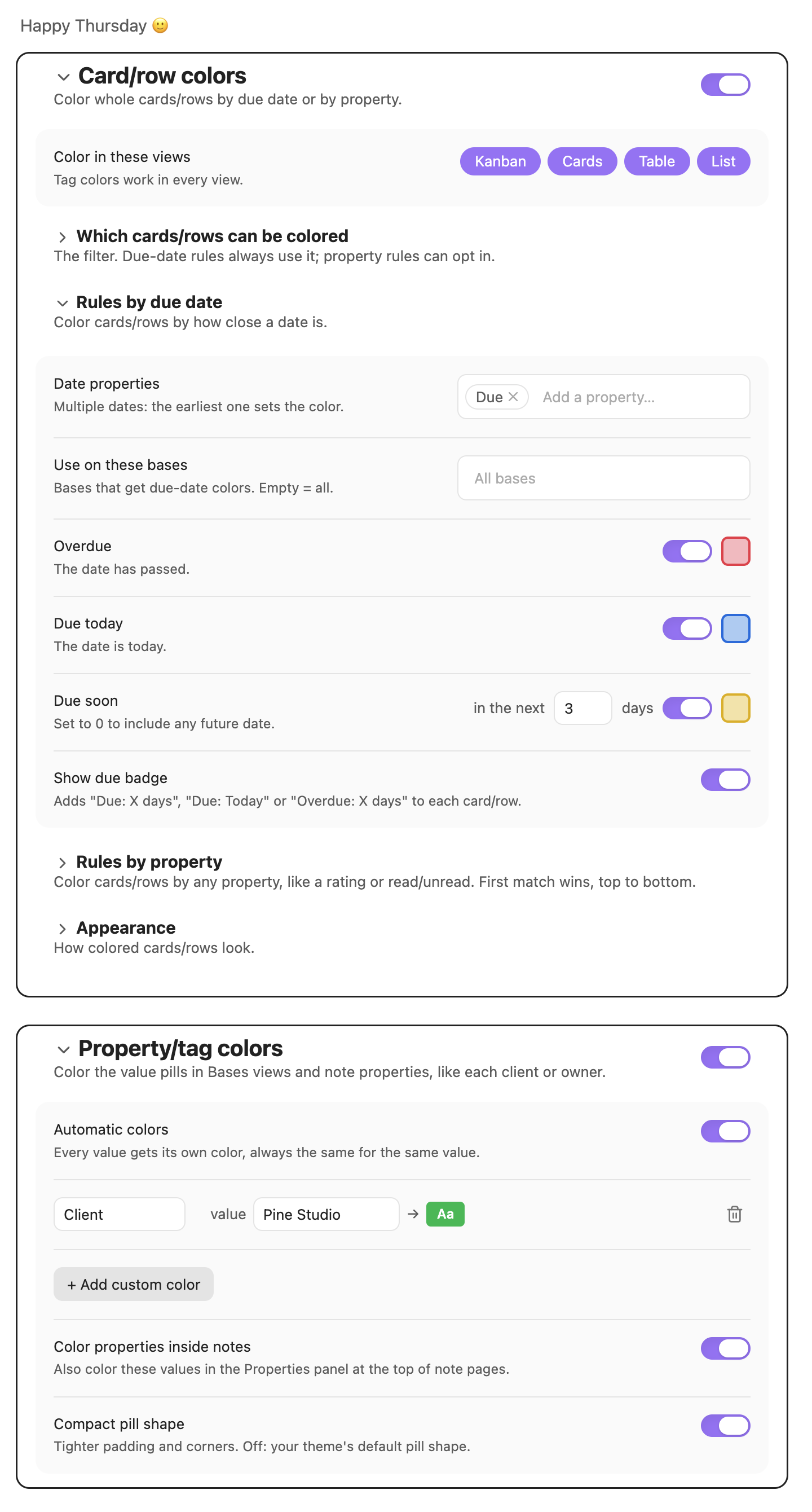 ### Card/row colors
| Setting | What it does |
|---|---|
| Color in these views | Which view types get colors: Kanban, Cards, Table, List. |
| Which cards/rows can be colored | The filter. Choose **all** or **any** of the conditions. Due-date colors always follow it; property rules can opt in. |
| Rules by due date | Date properties to check (the earliest date wins), which bases to use, the Overdue / Due today / Due soon colors. |
| Rules by property | **When** [property] [condition] [value] → color. Conditions: is, is not, is any of, contains, is greater than, is less than, is empty, is not empty. Each rule can follow the filter and be limited to specific bases. |
| Badges | Turn the due date badge on or off, and add custom badges: **When** [property] [condition] [value] → text or emoji, with an optional color. Badges follow the filter. |
| Appearance | Highlight style (Tint, Border only, Left stripe) and highlight strength. |
Numbers and dates compare as numbers and dates; text comparisons ignore capitalization and emoji.
### Property/tag colors
| Setting | What it does |
|---|---|
| Automatic colors | Give every value its own color. |
| Custom colors | A color for a specific value, for one property or any property. |
| Color properties inside notes | Also color values in the Properties panel at the top of notes. |
| Compact pill shape | Tighter padding and corners. Off: your theme's default pill shape. |
Each group has its own on/off switch, and every section can be collapsed.
## Installation
### From the community plugin list
Settings → Community plugins → Browse → search for "Bases Colors".
### Manually
1. Download `main.js`, `manifest.json` and `styles.css` from the latest release.
2. Put them in `/.obsidian/plugins/bases-kanban-card-colors/`.
3. Reload Obsidian and enable **Bases Colors** under Settings → Community plugins.
## Notes and limitations
- Obsidian doesn't yet offer an official way for plugins to style Bases views, so this plugin works with the views as Obsidian draws them. A future Obsidian update could change that; if colors stop appearing after an update, please open an issue.
- If you use another plugin that colors property values, turn off one of them to avoid conflicting colors.
- Cards whose notes share a file name with another note are matched to the note that has the properties your rules use.
- Colors update automatically at midnight.
- This plugin was called "Bases Kanban Card Colors" before version 1.1.0. Your settings carry over.
## License
[MIT](LICENSE)
### Card/row colors
| Setting | What it does |
|---|---|
| Color in these views | Which view types get colors: Kanban, Cards, Table, List. |
| Which cards/rows can be colored | The filter. Choose **all** or **any** of the conditions. Due-date colors always follow it; property rules can opt in. |
| Rules by due date | Date properties to check (the earliest date wins), which bases to use, the Overdue / Due today / Due soon colors. |
| Rules by property | **When** [property] [condition] [value] → color. Conditions: is, is not, is any of, contains, is greater than, is less than, is empty, is not empty. Each rule can follow the filter and be limited to specific bases. |
| Badges | Turn the due date badge on or off, and add custom badges: **When** [property] [condition] [value] → text or emoji, with an optional color. Badges follow the filter. |
| Appearance | Highlight style (Tint, Border only, Left stripe) and highlight strength. |
Numbers and dates compare as numbers and dates; text comparisons ignore capitalization and emoji.
### Property/tag colors
| Setting | What it does |
|---|---|
| Automatic colors | Give every value its own color. |
| Custom colors | A color for a specific value, for one property or any property. |
| Color properties inside notes | Also color values in the Properties panel at the top of notes. |
| Compact pill shape | Tighter padding and corners. Off: your theme's default pill shape. |
Each group has its own on/off switch, and every section can be collapsed.
## Installation
### From the community plugin list
Settings → Community plugins → Browse → search for "Bases Colors".
### Manually
1. Download `main.js`, `manifest.json` and `styles.css` from the latest release.
2. Put them in `/.obsidian/plugins/bases-kanban-card-colors/`.
3. Reload Obsidian and enable **Bases Colors** under Settings → Community plugins.
## Notes and limitations
- Obsidian doesn't yet offer an official way for plugins to style Bases views, so this plugin works with the views as Obsidian draws them. A future Obsidian update could change that; if colors stop appearing after an update, please open an issue.
- If you use another plugin that colors property values, turn off one of them to avoid conflicting colors.
- Cards whose notes share a file name with another note are matched to the note that has the properties your rules use.
- Colors update automatically at midnight.
- This plugin was called "Bases Kanban Card Colors" before version 1.1.0. Your settings carry over.
## License
[MIT](LICENSE)