# Move to New Folder
[](https://community.obsidian.md/plugins/move-to-new-folder)
[](https://github.com/d0d1/obsidian-move-to-new-folder/releases/latest)
[](https://github.com/d0d1/obsidian-move-to-new-folder/blob/main/LICENSE)
`Move to New Folder` is an Obsidian community plugin that moves a file or folder into a newly created folder without requiring you to type the full destination path.
## What it does
- Adds `Move file to new folder...` for notes
- Adds `Move folder to new folder...` in the file explorer for folders
- Lets you choose a parent folder from a searchable picker
- Creates the new child folder and moves the target safely with Obsidian APIs
- Preserves Obsidian's normal link-update behavior when moving files
## Preview
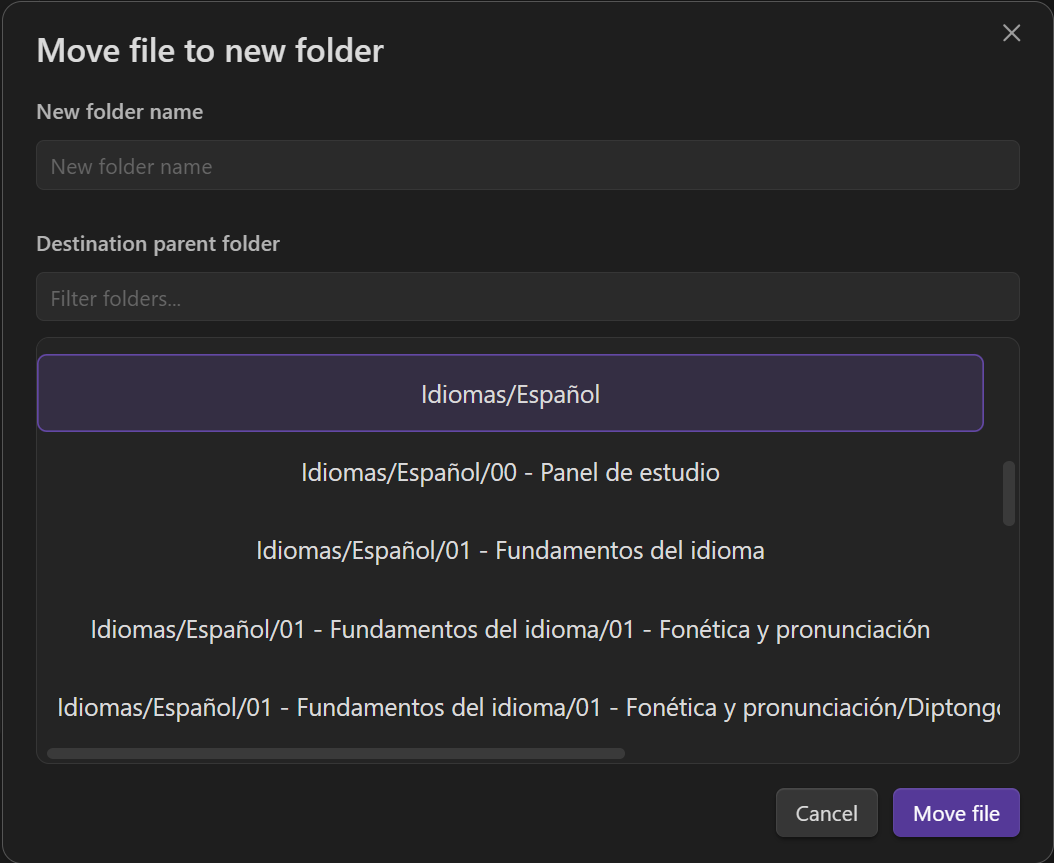 ## How to use it
### File explorer
1. Right-click a note or folder
2. Choose `Move file to new folder...` or `Move folder to new folder...`
3. Pick the parent folder
4. Enter the new folder name
5. Confirm the move
### Command palette
1. Open a note
2. Run `Move file to new folder...`
3. Complete the same modal flow
Folder moves are supported from the file explorer context menu.
## Settings
- **Default parent to current note folder**: start the picker from the active note's parent instead of vault root
## Platform support
- Designed for desktop and mobile
- Tested on Windows, Android, and Linux
- macOS and iOS have not been fully validated yet
## Installation
### From Community plugins
Install from Obsidian's Community plugins directory:
1. Open **Settings** in Obsidian
2. Go to **Community plugins** and choose **Browse**
3. Search for **Move to New Folder**
4. Select **Install**, then **Enable**
## How to use it
### File explorer
1. Right-click a note or folder
2. Choose `Move file to new folder...` or `Move folder to new folder...`
3. Pick the parent folder
4. Enter the new folder name
5. Confirm the move
### Command palette
1. Open a note
2. Run `Move file to new folder...`
3. Complete the same modal flow
Folder moves are supported from the file explorer context menu.
## Settings
- **Default parent to current note folder**: start the picker from the active note's parent instead of vault root
## Platform support
- Designed for desktop and mobile
- Tested on Windows, Android, and Linux
- macOS and iOS have not been fully validated yet
## Installation
### From Community plugins
Install from Obsidian's Community plugins directory:
1. Open **Settings** in Obsidian
2. Go to **Community plugins** and choose **Browse**
3. Search for **Move to New Folder**
4. Select **Install**, then **Enable**
Manual install from GitHub release
If you cannot use Community plugins, install the latest GitHub release manually:
1. Download `manifest.json`, `main.js`, and `styles.css` from the latest release
2. Create the folder `.obsidian/plugins/move-to-new-folder/` in your vault if it does not already exist
3. Copy the downloaded files into that folder
4. Enable **Move to New Folder** in Obsidian
## Privacy and external services
- No telemetry
- No analytics
- No network access
- No account requirement
- No payments or subscriptions
- No external service dependencies at runtime
## Docs
- [Use cases](https://github.com/d0d1/obsidian-move-to-new-folder/blob/main/docs/use-cases.md)
- [FAQ](https://github.com/d0d1/obsidian-move-to-new-folder/blob/main/docs/faq.md)