An Obsidian plugin for fiction writers: an outline that lives inside your chapters, word goals and sprints, placeholders, a safe place for the passages you cut, a revision lens, manuscript export, and a shared universe of characters and places.
Your books stay plain Markdown. Everything Escrita adds to a chapter is an Obsidian comment (`%% … %%`), so it is hidden in Reading view and by most publishing tools. Escrita never contacts a server or a model, and it never changes your prose unless you click.
Escrita is inspired by [NEO](https://github.com/hughhowey/neo) by Hugh Howey (MIT License). Parts of its design and logic are adapted from NEO. Escrita is not affiliated with NEO or its author.
## Install
It needs Obsidian **1.13 or later**. It works on desktop and on phones.
- **[Community plugins](https://obsidian.md/plugins?id=escrita)**: open Settings → Community plugins → Browse, search for "Escrita", then install and enable it.
- **With BRAT**: install the [BRAT](https://github.com/TfTHacker/obsidian42-brat) plugin, choose "Add a beta plugin", and enter `ClaudioDavi/escrita`.
- **Manually**: download `main.js`, `manifest.json` and `styles.css` from the latest [release](https://github.com/ClaudioDavi/escrita/releases), put them in `/.obsidian/plugins/escrita/`, reload Obsidian, and enable Escrita in Settings → Community plugins.
## Getting started
1. Enable Escrita. A notice offers to set the vault up; you can also run **Set up a writing vault** from the command palette.
2. The setup shows everything before it creates anything. Pick a starting point (Essentials, Writer or Everything), a layout, and the folders and examples you want.
3. Open the example short story or book, or run **Create a book**, and write. Escrita sets no hotkeys; bind the commands you use in Settings → Hotkeys.
Step by step: [Getting started](docs/guide/en/getting-started.md) ([Português](docs/guide/pt-BR/getting-started.md)).
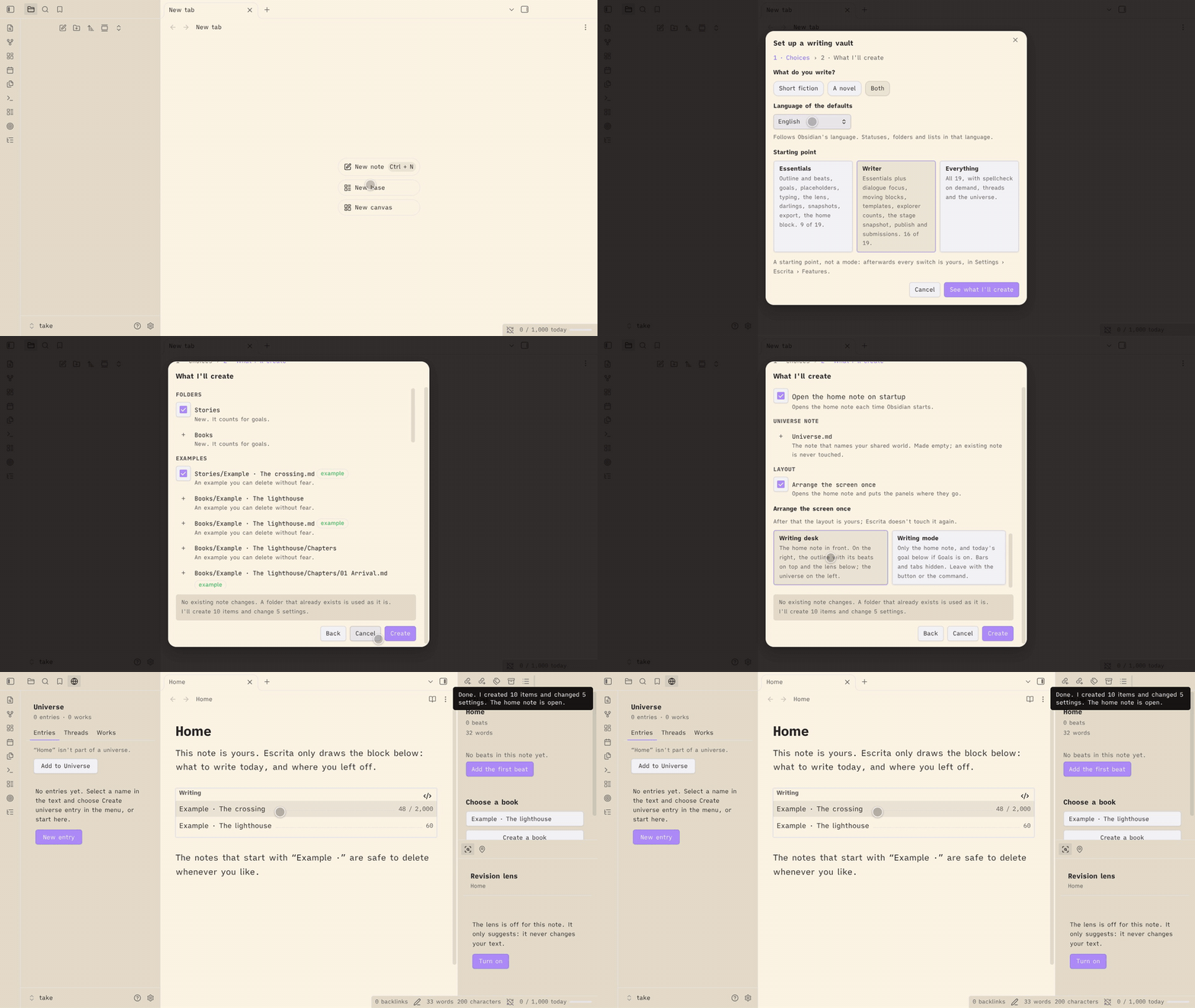
## What Escrita does
Each part is a switch on the Features page, so you can turn off what you don't use. Every command and setting is described in the guide for its group. The guides are in English and in Brazilian Portuguese.
**Features and settings.** The Features page turns each part on or off. It has three starting points (Essentials, Writer, Everything), and a fresh install takes its defaults (status words, folder names) from Obsidian's language. A feature that is off isn't loaded, and its data stays. Guide: [English](docs/guide/en/features-and-settings.md) · [Português](docs/guide/pt-BR/features-and-settings.md).
**Writing.** The outline sits in the sidebar and lists your chapters and their beats, with point of view, filters, a board and a "Read the book" view. Goals, pacing, sprints, days off, targets for a single short story or essay, placeholders, Enter flow, smart typography, dialogue focus, moving a paragraph or scene, templates, spellcheck on demand and word counts in the file explorer are here too. Guide: [English](docs/guide/en/writing.md) · [Português](docs/guide/pt-BR/writing.md).
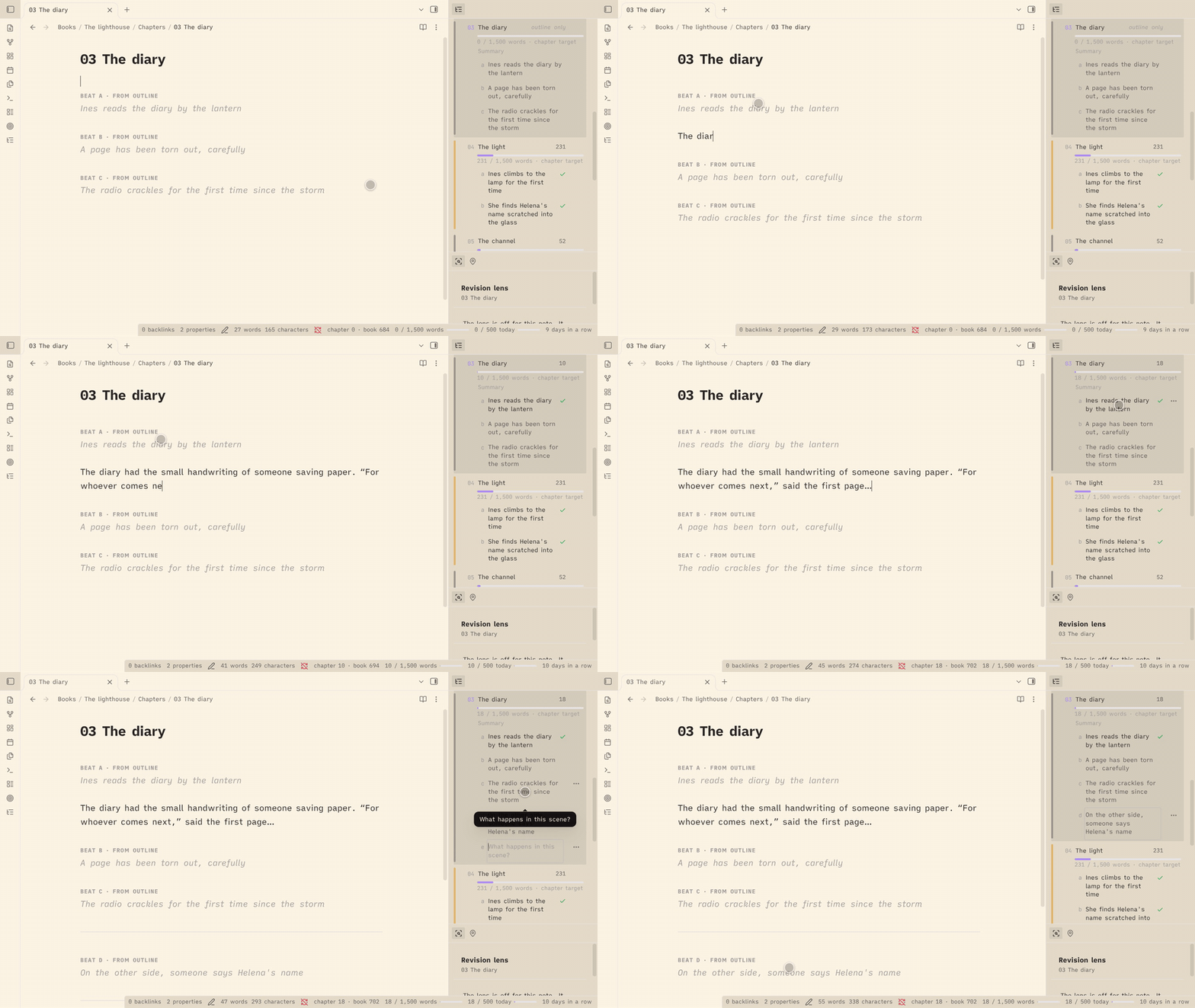
**Tracking.** Works move through five stages (idea, draft, revision, ready, published), mapped to your own status words. The home note shows what to write today and opens each work where you left off. Writing mode strips the screen down to the note. A snapshot is taken at each stage change. Guide: [English](docs/guide/en/tracking.md) · [Português](docs/guide/pt-BR/tracking.md).
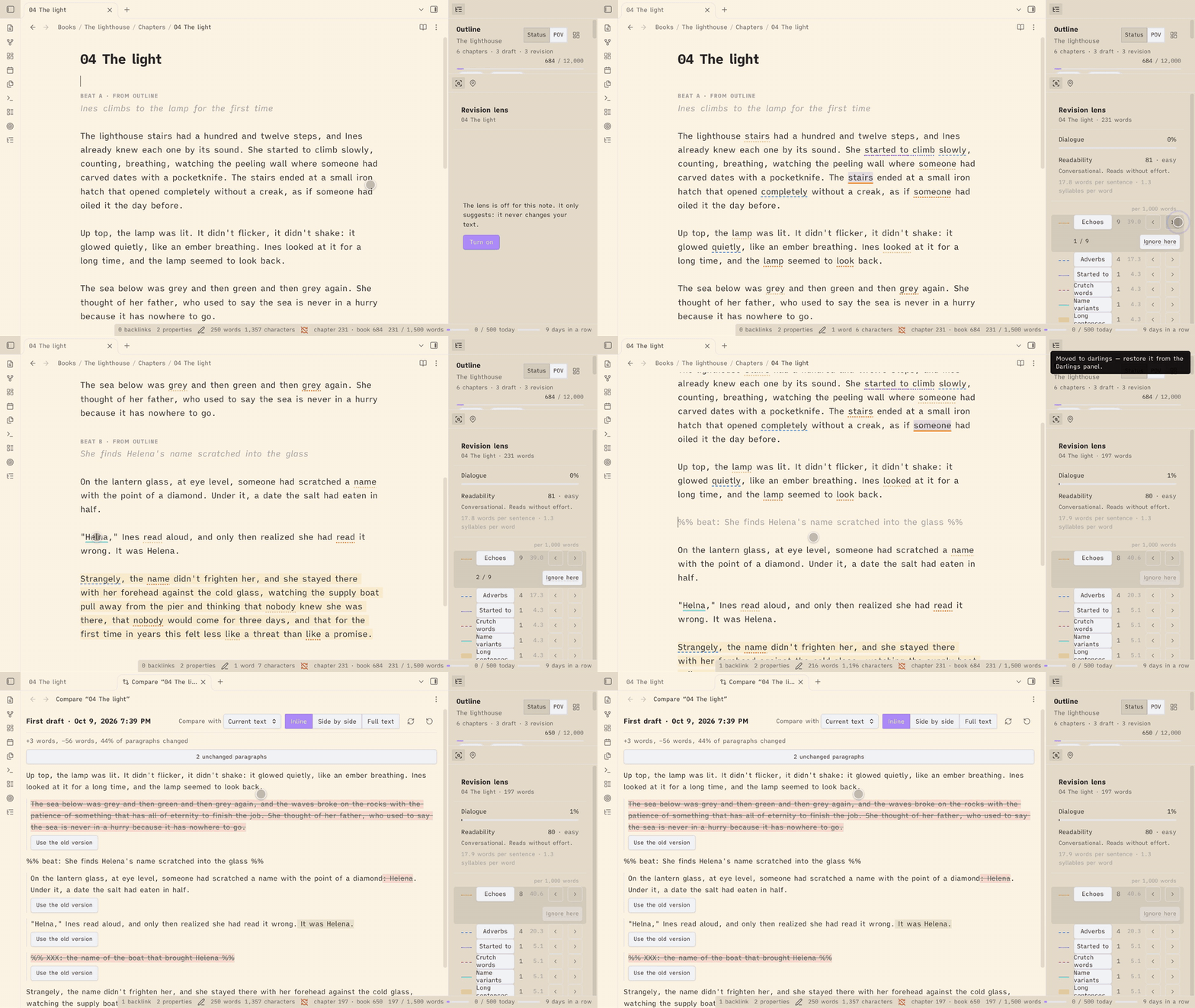
**Revision.** The revision lens underlines what is worth rereading (echoes, adverbs, gerunds, crutch words, name variants, long sentences) and never changes your text. Snapshots keep named and automatic copies of a note that you can compare word by word and restore. Darlings keep the passages you cut, restorable to where they came from. Guide: [English](docs/guide/en/revision.md) · [Português](docs/guide/pt-BR/revision.md).
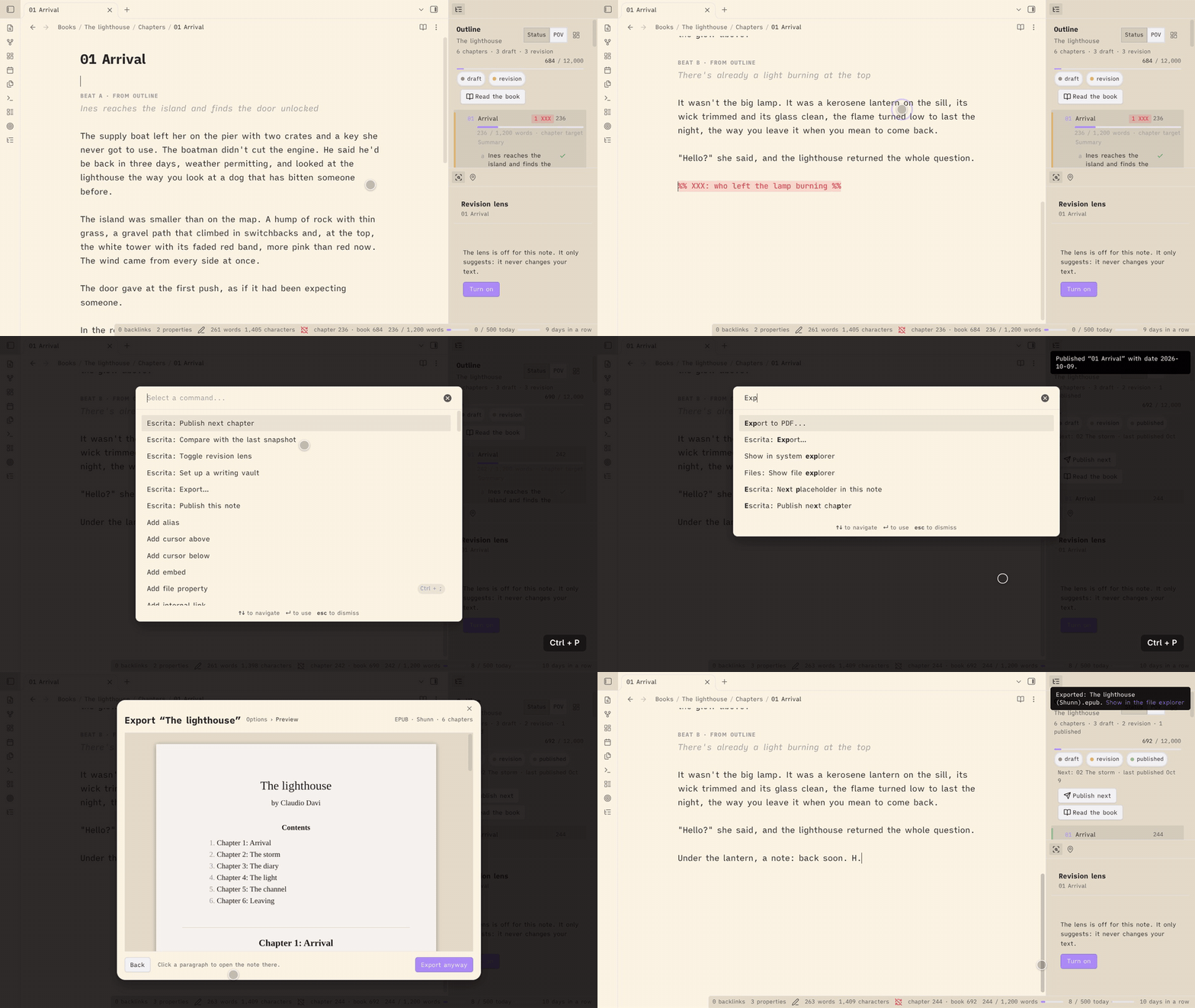
**Publishing.** The publish check looks for open comments, placeholders and unwritten beats before you mark a note published. Export writes Markdown, DOCX or EPUB (Shunn and pt-BR templates), for a note, a book or a collection of short stories. Submissions record where a work was sent and what came back. Guide: [English](docs/guide/en/publishing.md) · [Português](docs/guide/pt-BR/publishing.md).
**The world.** A shared universe of characters, places, objects, groups and events, with "Appears in", unlinked mentions, names in the editor and the revision lens, and open threads you plant in one story for a later one. Guide: [English](docs/guide/en/the-world.md) · [Português](docs/guide/pt-BR/the-world.md).
## Privacy
No network access, no AI, no telemetry. Escrita never contacts a server or a model, and a test fails if network code ever appears in its source or in the built plugin. Your writing stays in your vault. Word history, settings and what Escrita remembers about published notes are saved in the plugin's `data.json` inside your vault's `.obsidian/plugins/escrita/` folder.
## Languages
Escrita follows Obsidian's language setting. It ships in:
- English
- Português (Brasil)
To add a language, add a key for it (for example `es` or `fr`) with translated strings to `src/strings.ts` and to each `src/*/strings.ts`. English is the source of truth. Missing strings fall back to English. Pull requests are welcome.
## Development
```
npm install
npm run dev # bundle styles.css once, then rebuild main.js on every change
npm run build # type check, bundle styles.css and make a production main.js
npm test # unit tests
```
To try your build, link or copy the repository folder into a test vault's `.obsidian/plugins/escrita/`.
To release, run `npm version --no-git-tag-version` (it updates `manifest.json` and `versions.json`), commit, then push a tag with the bare version number (for example `git tag 0.1.1 && git push --tags`). The release workflow builds the plugin and drafts a GitHub release with `main.js`, `manifest.json` and `styles.css`; publish the draft when it looks right.
## Changelog
### 1.0.3 (2026-10-12)
Escrita's settings now appear in Obsidian's settings search. Nothing else changes in how Escrita works.
- **Settings search**: type in the search box at the top of Obsidian's settings and every Escrita row is found, with a click that lands on it. Each section is a group card under its heading.
- Upgrade notes:
- Escrita now needs Obsidian 1.13 or later (`minAppVersion`). Obsidian does not offer this update to an older app, which keeps 1.0.2.
- Your settings and switches are unchanged.
- Under the hood: the settings rows come from one set of row helpers, and a cleared field falls back to the default of your install's language in every section. Two section headings are now fully in one language: "Revision · the lens" and "Publishing · the check" (in Portuguese, "Revisão · a lente" and "Publicação · a checagem").
### 1.0.2 (2026-10-11)
Escrita is in Obsidian's community plugins list. Nothing changes in how Escrita works.
- Install: the README and the getting-started guides (English and Português) link to [Escrita in the community plugins list](https://obsidian.md/plugins?id=escrita).
- The English README and guides say "short story" where they said "conto". Portuguese example values (a `Contos` folder, the `conto` form) are unchanged.
### 1.0.1 (2026-10-09)
Fixes from Obsidian's review of the plugin for the community directory. Nothing changes in how Escrita works.
- Removing an empty snapshot folder now follows your "Deleted files" setting (system trash, Obsidian's `.trash` or delete) like every other removal.
- The file explorer's placeholder dot no longer uses a `:has` selector, which could slow down a large explorer.
- Build and type fixes: no `builtin-modules` package, and no deprecated button call.
### 1.0.0 (2026-10-09)
The full release. Everything from 0.9 is still here; 1.0 adds a way in and finishes the guides.
- **Set up a writing vault**: a first-run notice and a command that show everything before they create anything. You choose the starting point, the layout, the folders and the examples. It never overwrites or moves a note.
- **Presets**: **Essentials**, **Writer** and **Everything** on the Features page set the switches at once, after a step that lists what will change. A fresh install starts with Writer.
- **Writing mode**: write with only the note on screen. See [Tracking](docs/guide/en/tracking.md).
- **Defaults in your language**: a fresh install takes its status words, folder names and examples from Obsidian's language (any Portuguese gives Portuguese, anything else gives English). They are saved once and never change after that.
- **The effective piece**: a chapter that takes its book's `chapterTarget` now shows the same target everywhere: the outline, the file explorer and the status bar. Before, the outline showed it and the others did not.
- **Mobile pass**: the views, modals and menus were checked at phone width, with touch targets of at least 32 px and no hover-only control. A regex lookbehind that stopped Escrita from loading on older iPhones (Safari before 16.4) is gone, and a test keeps it out.
- **Universe "⋯" button**: each entry row in the universe panel has a visible more button for its actions, so a phone or tablet doesn't need a right-click.
- **Guides complete**: all seven pages, in English and Brazilian Portuguese: [Getting started](docs/guide/en/getting-started.md), [Features and settings](docs/guide/en/features-and-settings.md), [Writing](docs/guide/en/writing.md), [Tracking](docs/guide/en/tracking.md), [Revision](docs/guide/en/revision.md), [Publishing](docs/guide/en/publishing.md) and [The world](docs/guide/en/the-world.md). Every command and setting appears in a guide, and this README is now the front door to them.
- Upgrade notes:
- Escrita now needs Obsidian 1.8.7 or later (`minAppVersion`).
- Your existing settings are unchanged, and the setup notice does not show on an update. An existing install keeps the English defaults it was using, even when Obsidian runs in Portuguese, so no folder or status word changes under you.
- Every feature stays as it was, and every switch keeps its state.
- **Threads in Portuguese**: a new Portuguese install marks threads as `%% thread: … %%` and `%% thread fechada: … %%`, and the interface says "thread". An install that already saved `fio` keeps it.
- Fixes before release: clearing a setting restores the default in your install's language, not English (a cleared closed word in Portuguese stays `fechada`); the setup and **Open the home note** find the same home note and adopt an existing one instead of creating a second; the darlings note is written through the editor when it is open, so undo works; dialogue focus and the name marks no longer stop after one failed redraw. From the demo rehearsal: the setup's rows no longer overlap, it creates the universe note for a shared world, ticks the layout in a new vault and gives each row an honest reason; the home note opens in the main area on startup, not in a side panel; Escape on a beat you just made in the outline takes it back out; a new universe entry opens in a tab, not a split; "Appears in" shows counting until a new entry is counted; the EPUB byline uses the full name and its preview lists the contents once; the Compare view and the lens panel show their titles whole; and the progress window opened for a book or piece no longer reads the daily goal against that work's words.
- Internal: shared helpers moved out of module folders (`core/` and `ui/`), and the Obsidian guidelines lint (`eslint-plugin-obsidianmd`) runs in CI.
### 0.9.0
- **Unlinked mentions**: the universe panel lists the places in the note you are in where an entry is named without a link. **Create link** turns that one mention into a link, on your click, and writes nothing else. See [The world](docs/guide/en/the-world.md#11-unlinked-mentions).
- **Names without an entry**: a new revision lens rule, off until you turn it on, marks capitalized names that recur (5 times in the note, or in 2 works) and match no entry. **Create** opens the new-entry dialog with the name filled in; **Dismiss** adds the word to the **Not names** setting. See [The world](docs/guide/en/the-world.md#names-without-an-entry).
- **EPUB export**: **Export…** now offers EPUB 3 beside Markdown and DOCX, with a title page, a table of contents, one file per chapter, an ornamental scene break (a setting) and an optional cover from a `cover` property. See [Publishing](docs/guide/en/publishing.md#export-an-epub).
- **Collections**: select several short stories in the file explorer, right-click, **Create a collection…**. The note lists the stories in a `contents` property and exports as one DOCX, EPUB or Markdown file. See [Publishing](docs/guide/en/publishing.md#export-a-collection-of-stories).
- **Publish next chapter**: for a book released one chapter at a time, the command and an outline button open the first unpublished chapter's publish check; the outline header shows the next chapter, the last published and any gap, and the check warns when an earlier chapter isn't published. See [Publishing](docs/guide/en/publishing.md#publish-a-book-one-chapter-at-a-time).
- **Read the book**: a read-only view of every chapter in order, with the export's chapter headings and scene breaks and your markers hidden. Click a paragraph to open that chapter at that line; it remembers where you stopped. See [Writing](docs/guide/en/writing.md#read-the-book).
- **Settings**: Not names, the cover property, the EPUB scene break and the collection property. See [Features and settings](docs/guide/en/features-and-settings.md#settings-added-in-09).
- Upgrade notes:
- The revision lens runs one new pass after the update. Nothing is marked by the new names rule until you turn it on.
- Internal: scope is a field of the classifier (`books.classify(x).scope`) and `core/scope.ts` holds the rule; the names port answers the lens's names rule; the EPUB writer is checked with EPUBCheck in CI.
### 0.8.0
- **Export**: **Export…** turns the active note, or its whole book, into a manuscript file: Markdown or DOCX, in the Shunn (Letter, English) or pt-BR (A4, Portuguese labels) template. A preview shows the manuscript before the file is written, readiness warnings link to their lines, and **Export again** repeats the last export in one click. Files go to the export folder (default `Escrita/Exports`). See [Publishing](docs/guide/en/publishing.md#export-a-note-or-a-book).
- **Chapters without a number**: a chapter numbered `00` is a prologue (first, its title alone, not counted), and the new **Chapters without a number** setting lists titles (such as an epilogue) that also export with their title alone. See [Publishing](docs/guide/en/publishing.md#export-a-note-or-a-book).
- **Author and contact**: settings for your name, surname and contact lines, used on the title page and in the header. An `author` property on a book or a note overrides the name.
- **Submissions**: **Record a submission** makes one note per submission in the submissions folder (default `Escrita/Submissions`), with the work, the market, the date and the result. The home block shows how many are pending. See [Publishing](docs/guide/en/publishing.md#record-a-submission).
- **Settings**: each feature now draws its own section, in the same order as before, and a text field saves when you leave it instead of on every key. Export and submissions are two new switches on the Features page, which now has 19.
- **Performance**: index passes now yield every 8 ms, so Obsidian stays responsive while a large vault is read. "Appears in" builds on demand, when you first open it, so startup index work on a 3,000-note vault drops from about 4.2 s to under 0.1 s, and typing in a long chapter no longer recomputes mentions. Name matching and the revision lens are faster.
- **Fix**: only a `