# DeepHarness — DeepSeek Harness for Obsidian
> **[中文版](./readme-ch.md) · English**
A Claudian-style AI assistant plugin for Obsidian: it calls **DeepSeek Harness** directly from the side panel. Send a task to the chat window and the DSH agent works in your vault as its working directory, using its full toolset (bash, file read/write, web search, subagents, …) autonomously.
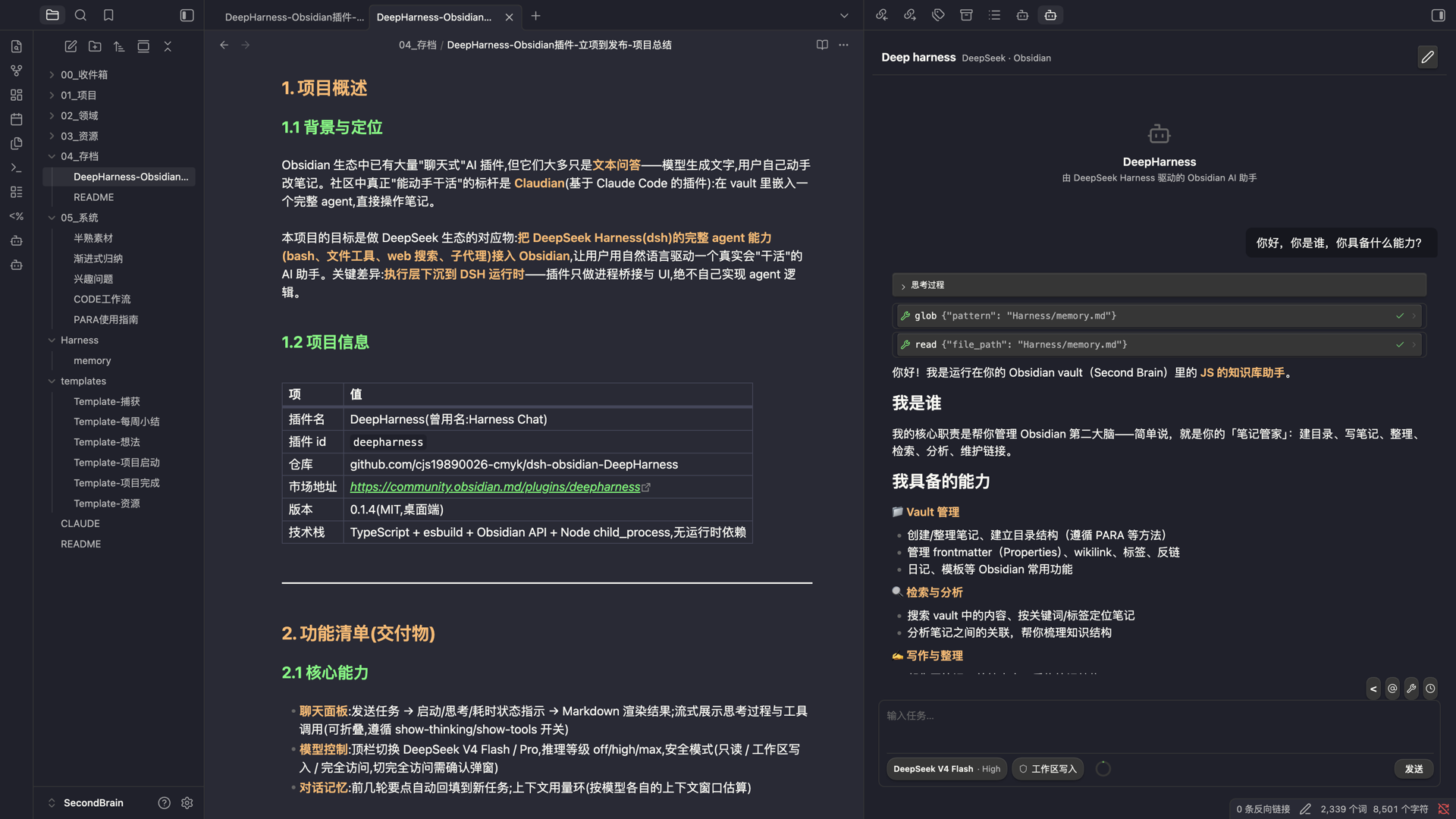
Feature showcase — send a task in the side panel, and the DeepSeek Harness agent works in your vault.
> Design document: [`DESIGN.md`](./DESIGN.md). This repo was designed based on an analysis of
> [Enigmora/claudian](https://github.com/Enigmora/claudian); the key difference is that
> **execution is pushed down to the DSH runtime** — the plugin only bridges the process and renders the UI.
## How it works
```
Obsidian plugin ──spawn──▶ dsh --profile headless --patch ""
│ cwd = vault root
│ DSH_HOME = ~/.dsh (reuses your credentials/model config)
▼
DeepSeek Harness agent
bash │ file tools │ web_search │ subagents …
```
Verified locally: `dsh --profile headless "use bash to run pwd and ls…"` works end-to-end.
## Prerequisites
1. Install the DSH CLI:
```bash
npm i -g @deepseek-ai/dsh
```
2. Configure model credentials (either one):
- DSH web (Models page) writes `~/.dsh/.credentials.yaml`
- Or export the `DEEPSEEK_API_KEY` environment variable
3. Click "Run check" on the plugin settings page to confirm `dsh` is detected.
## Installation
### From the Obsidian community plugin market (recommended)
1. Open Obsidian → **Settings → Community plugins**.
2. Turn off **Restricted mode** if needed.
3. Click **Browse**, then search for **DeepHarness**.
4. Click **Install**, then **Enable**.
5. Open **DeepHarness settings** and run the **Check** button to verify `dsh` is detected.
### From GitHub Release / source (development)
```bash
npm install
npm run build
# Copy into your vault:
cp -r dist /path/to/vault/.obsidian/plugins/deepharness/
```
After enabling the plugin, click the bot icon in the left ribbon to open the chat panel.
## Features
- 💬 **Chat panel**: send a task → status indicator (starting / thinking / elapsed) → Markdown-rendered result
- 🧠 **Model list you own**: the model dropdown is fed by an editable list in the settings, so a model DeepSeek shipped after this plugin release can be added by typing its id — no plugin update needed. Entries can be added or removed at any time, and the built-in ones can be deleted too. An **Import from DSH** button pulls in the ids your own DSH settings declare, only when you press it. Defaults to `deepseek-flash` (DeepSeek's rolling alias on the official API)
- ⚙️ **Reasoning effort (Thinking)**: switch **off / high / max** in the toolbar
- Written to the plugin-owned DSH_HOME (`dsh-home/` directory) via the `agent-default-model` config; credentials are symlinked from `~/.dsh` — the global DSH settings are **never polluted**
- ⏹ **Stop button** (SIGTERM) and a timeout fallback (default 10 minutes)
- 📝 **Conversation memory**: key points from earlier turns are automatically refilled into new tasks
- 🕘 **Session history**: conversations are archived per session; the history panel supports resume / pin / rename / note. The current session is atomically persisted after every turn — sessions that were not archived when Obsidian quit/crashed are restored into history on next launch, so nothing is lost
- 📋 **Copy / Save as note** in one click; UI text is selectable
- 🔗 **Reference current note**: the quote icon in the toolbar above the input inserts the note you are reading — if you have **text selected** in the note, the selection is inserted as a quoted block (auto-truncated with a source line); **without a selection** it inserts a bare wikilink (modeled after Claudian's New conversation)
- @ **Mention notes**: type `@` in the input box to search and reference any note in the vault — live title/path matching, inserted as `[[path]]` (scoped by the "Working directory" setting)
- ⚙️ **Command**: "Process current note"
- 🗂 **Generated vault persona** (`.obsidian/plugins/deepharness/generated/vault.yml`)
instructs the agent to use wikilinks and ask before destructive operations; freely editable
- 🩺 **Environment check + diagnostics**: reports `dsh`, Node.js and the three paths the plugin must write, and gives a concrete remedy for each failure (install command, which path to fix, or the usual sync-folder / permission causes). A failing check can produce a copyable report you can hand to any assistant to diagnose
- 🔄 **Update check**: shows whether a newer release exists. The plugin never downloads or installs updates itself — that stays with Obsidian, so the store's review and signed releases are never bypassed
- 🌐 **i18n UI** (English / 中文)
## Settings
| Setting | Default | Description |
|---|---|---|
| dsh binary path | auto-detect | Empty = PATH |
| Node.js path | auto-detect | The plugin runs the dsh script with node directly (bypasses the shebang issue under Obsidian's restricted PATH) |
| DSH_HOME | `~/.dsh` | Credentials/config root |
| Plugin API key | empty | DeepSeek API key used ONLY by this plugin (separate from the desktop app); empty = reuse desktop credentials |
| Model provider | DeepSeek official API | deepseek-official = DeepSeek official API; opencode-go = OpenCode Go subscription (OpenAI-compatible, https://opencode.ai/zen/go/v1) |
| Working directory | vault root | Relative subfolder to scope the agent |
| Task timeout | 600s | Auto-stops the run when exceeded |
| Conversation memory | on | Context refill |
| Tool execution mode | default (native) | native / code / both (tool backend, not a file sandbox) |
| Model | `deepseek-flash` | Selected from the editable **Model list** below it; add any model id to use a model newer than this plugin release |
| Model list | 4 built-in ids | The models offered in the dropdowns. Add or delete any id; **Import from DSH** appends the ids your own DSH settings declare, only when pressed |
| Reasoning effort | high | off / high / max; switchable from the toolbar |
| Security mode | workspace write | read-only / workspace write / full access |
| Show thinking | on | Collapsible thinking block before the answer |
| Show tool calls | on | Shows tool invocations (bash, file ops) as they run |
| History entries | 50 | Max sessions kept in the history panel; oldest removed first |
| Custom persona | empty | Extra instructions appended to the agent system prompt |
## Security
- The agent's file tools are scoped to the vault; **however the bash tool runs with user-level permissions** (headless has no file sandbox by default), so the persona rules require the agent not to modify files outside the vault and to ask before destructive operations
- Credentials go through existing DSH configuration by default (the plugin collects nothing); optionally you can set a plugin-only API key, which is stored in the local plugin data file and injected as an environment variable at run time — never shared with the desktop app
- All child processes are terminated when the plugin unloads
- The only request the plugin makes on its own behalf is the update check, and only when you press it: it asks the public GitHub releases API for this repository's latest version. No telemetry, and the diagnostic report contains no credentials
## Roadmap
- **Phase 2** (mostly done): streaming output, tool-call logs, persistent session history
- Remaining: file-modification diff confirmation
- **Phase 3**: batch processing of vault notes, long-term memory (`Harness/memory.md`), run history
See [`DESIGN.md`](./DESIGN.md) section 8.
## License
MIT