# Folder Pin View
固定常用文件夹,快速切换父目录与子目录,专注当前内容。
Pin your folders, switch between parent folders and subfolders, and focus on what matters.
**版本 / Version:** 2.2.6 · **Obsidian:** 1.13.0+ · **许可 / License:** MIT
## 实际效果 / Screenshots
| 原生文件列表 / Native explorer | 文件夹置顶视图 / Folder Pin View |
| --- | --- |
| 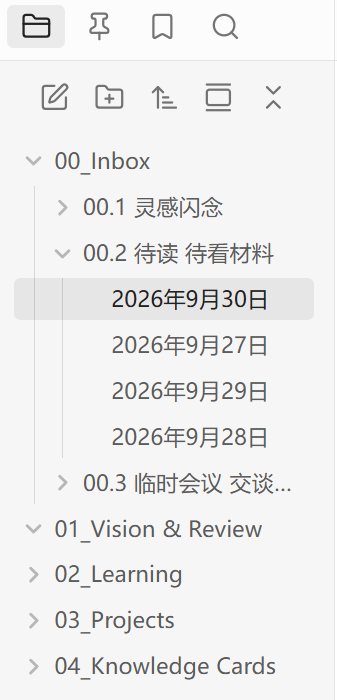 |
| 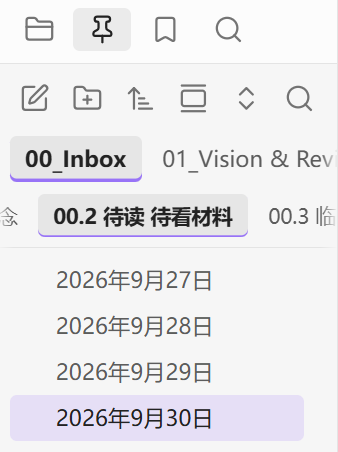 |
## 功能 / Features
| 中文 | English |
| --- | --- |
| **两层快捷栏**:固定父目录,快速切换直接子目录;两排均可拖动排序。 | **Folder tabs:** Pin parents, switch to direct subfolders, and drag either row to reorder. |
| **目录内搜索**:搜索当前目录及下级目录的内容,沿用原生搜索语法。 | **Folder search:** Search content in the current folder and its descendants using native syntax. |
| **原生打开与拖放**:Ctrl/Cmd 或中键打开新标签页;拖到编辑器生成链接,拖到白板添加卡片。 | **Native opening & dragging:** Ctrl/Cmd-click or middle-click opens new tabs. Drop into an editor for links or a canvas for cards. |
| **文件管理**:新建、重命名、删除、批量移动;右键接入白板、数据库等原生菜单。 | **File management:** Create, rename, delete and move items in batches, with native Canvas and Bases menus. |
| **多选与导航**:独立多选模式、Shift 连选、键盘导航、六种排序、可选自动定位。 | **Selection & navigation:** Selection mode, Shift ranges, keyboard navigation, six sort modes and optional auto-reveal. |
| **自适应界面**:窄侧栏工具栏保持单行;中英双语、主题适配、目录状态记忆。 | **Adaptive interface:** Single-row toolbar in narrow sidebars, Chinese/English, theme support and per-folder state. |
## 安装与更新 / Install & Update
从 [Releases](https://github.com/cimuyang/folder-pin-view/releases) 下载并解压安装包,将 `main.js`、`manifest.json`、`styles.css` 放入笔记库的 `.obsidian/plugins/folder-pin-view/`,然后启用插件。
Download and extract the package from [Releases](https://github.com/cimuyang/folder-pin-view/releases). Copy `main.js`, `manifest.json` and `styles.css` into your vault's `.obsidian/plugins/folder-pin-view/`, then enable the plugin.
更新时先停用插件,替换上述三个文件,**保留 `data.json`**,再启用。
To update, disable the plugin, replace the three files, **keep `data.json`**, then enable it again.
## 使用 / Usage
1. 在原生文件列表中右键文件夹,选择“固定文件夹”。第一排浏览父目录,第二排切换子目录;第二排可在设置中关闭。
Right-click a folder in the native explorer and choose **Pin folder**. Use the first row for parents and the second for subfolders; the second row is optional.
2. 右键进入“多选模式”,点击选择项目;右键可批量打开、移动或删除。按 Esc 或点击“完成”退出;Shift 可连选。
Enter **Select multiple items** from the context menu. Click to select, then right-click to open, move or delete the selection. Exit with Escape or **Done**; Shift selects a range.
3. 点击工具栏第六个搜索按钮,在括号内输入关键词。范围为点击时选定的目录及下级目录;删除查询中的目录条件会恢复全库搜索。
Click the sixth toolbar button and type inside the parentheses. Search covers the folder selected when clicked and its descendants; removing the path condition searches the whole vault.
4. 拖到文件夹或标签可移动文件;拖到编辑器或白板可创建链接或卡片,保留源文件。
Drop onto a folder or tab to move files. Drop into an editor or canvas to create links or cards while keeping the source files.
目录搜索需要启用“搜索”核心插件;白板、数据库菜单随对应核心插件的启用状态变化。
Folder search requires the Search core plugin. Canvas and Bases menu items depend on their core plugins being enabled.
**快捷键 / Shortcuts:** ↑↓ 导航 / Navigate · Enter 打开 / Open · F2 重命名 / Rename · Ctrl/Cmd+点击 / Click 新标签页 / New tab · Shift 连选 / Range · Esc 退出多选 / Exit selection · 多选模式下 / In selection mode: Ctrl/Cmd+A 全选可见项目 / Select visible items
## 2.2.6 更新 / What's New in 2.2.6
- **新标签页打开**:Ctrl/Cmd 点击与中键点击沿用原生习惯。
**New tabs:** Ctrl/Cmd-click and middle-click follow native opening behavior.
- **独立多选模式**:显示已选数量,支持批量打开、移动和删除。
**Selection mode:** Selection count plus batch opening, moving and deletion.
- **原生右键菜单**:空白处和文件夹支持新建白板、数据库及菜单扩展。
**Native context menus:** Blank areas and folders support Canvas, Bases and menu integrations.
- **编辑器与白板拖放**:支持单文件、多文件拖放,保留原有拖动移动。
**Editor & canvas drops:** Drag single or multiple files, alongside existing drag-to-move.
- **当前目录内容搜索**:新增第六个按钮,打开带目录条件的原生搜索。
**Folder content search:** A sixth button opens native Search with a folder filter.
- **窄侧栏适配**:自动收紧间距与按钮,六个操作保持单行。
**Narrow sidebar support:** Spacing and buttons adapt to keep all six actions on one row.
## 开发 / Development
Node.js 24:
```sh
npm ci
npm run typecheck
npm test
npm run build
```
`npm run dev` 监听源码变化。发布文件为 `main.js`、`manifest.json`、`styles.css`。
`npm run dev` watches source changes. Release files are `main.js`, `manifest.json` and `styles.css`.
## 隐私与许可 / Privacy & License
插件不发送网络请求,不收集遥测数据;设置仅保存在笔记库的插件目录 `data.json` 中。[MIT License](LICENSE)。
The plugin makes no network requests and collects no telemetry. Settings stay in `data.json` in the vault's plugin directory. [MIT License](LICENSE).
|
## 功能 / Features
| 中文 | English |
| --- | --- |
| **两层快捷栏**:固定父目录,快速切换直接子目录;两排均可拖动排序。 | **Folder tabs:** Pin parents, switch to direct subfolders, and drag either row to reorder. |
| **目录内搜索**:搜索当前目录及下级目录的内容,沿用原生搜索语法。 | **Folder search:** Search content in the current folder and its descendants using native syntax. |
| **原生打开与拖放**:Ctrl/Cmd 或中键打开新标签页;拖到编辑器生成链接,拖到白板添加卡片。 | **Native opening & dragging:** Ctrl/Cmd-click or middle-click opens new tabs. Drop into an editor for links or a canvas for cards. |
| **文件管理**:新建、重命名、删除、批量移动;右键接入白板、数据库等原生菜单。 | **File management:** Create, rename, delete and move items in batches, with native Canvas and Bases menus. |
| **多选与导航**:独立多选模式、Shift 连选、键盘导航、六种排序、可选自动定位。 | **Selection & navigation:** Selection mode, Shift ranges, keyboard navigation, six sort modes and optional auto-reveal. |
| **自适应界面**:窄侧栏工具栏保持单行;中英双语、主题适配、目录状态记忆。 | **Adaptive interface:** Single-row toolbar in narrow sidebars, Chinese/English, theme support and per-folder state. |
## 安装与更新 / Install & Update
从 [Releases](https://github.com/cimuyang/folder-pin-view/releases) 下载并解压安装包,将 `main.js`、`manifest.json`、`styles.css` 放入笔记库的 `.obsidian/plugins/folder-pin-view/`,然后启用插件。
Download and extract the package from [Releases](https://github.com/cimuyang/folder-pin-view/releases). Copy `main.js`, `manifest.json` and `styles.css` into your vault's `.obsidian/plugins/folder-pin-view/`, then enable the plugin.
更新时先停用插件,替换上述三个文件,**保留 `data.json`**,再启用。
To update, disable the plugin, replace the three files, **keep `data.json`**, then enable it again.
## 使用 / Usage
1. 在原生文件列表中右键文件夹,选择“固定文件夹”。第一排浏览父目录,第二排切换子目录;第二排可在设置中关闭。
Right-click a folder in the native explorer and choose **Pin folder**. Use the first row for parents and the second for subfolders; the second row is optional.
2. 右键进入“多选模式”,点击选择项目;右键可批量打开、移动或删除。按 Esc 或点击“完成”退出;Shift 可连选。
Enter **Select multiple items** from the context menu. Click to select, then right-click to open, move or delete the selection. Exit with Escape or **Done**; Shift selects a range.
3. 点击工具栏第六个搜索按钮,在括号内输入关键词。范围为点击时选定的目录及下级目录;删除查询中的目录条件会恢复全库搜索。
Click the sixth toolbar button and type inside the parentheses. Search covers the folder selected when clicked and its descendants; removing the path condition searches the whole vault.
4. 拖到文件夹或标签可移动文件;拖到编辑器或白板可创建链接或卡片,保留源文件。
Drop onto a folder or tab to move files. Drop into an editor or canvas to create links or cards while keeping the source files.
目录搜索需要启用“搜索”核心插件;白板、数据库菜单随对应核心插件的启用状态变化。
Folder search requires the Search core plugin. Canvas and Bases menu items depend on their core plugins being enabled.
**快捷键 / Shortcuts:** ↑↓ 导航 / Navigate · Enter 打开 / Open · F2 重命名 / Rename · Ctrl/Cmd+点击 / Click 新标签页 / New tab · Shift 连选 / Range · Esc 退出多选 / Exit selection · 多选模式下 / In selection mode: Ctrl/Cmd+A 全选可见项目 / Select visible items
## 2.2.6 更新 / What's New in 2.2.6
- **新标签页打开**:Ctrl/Cmd 点击与中键点击沿用原生习惯。
**New tabs:** Ctrl/Cmd-click and middle-click follow native opening behavior.
- **独立多选模式**:显示已选数量,支持批量打开、移动和删除。
**Selection mode:** Selection count plus batch opening, moving and deletion.
- **原生右键菜单**:空白处和文件夹支持新建白板、数据库及菜单扩展。
**Native context menus:** Blank areas and folders support Canvas, Bases and menu integrations.
- **编辑器与白板拖放**:支持单文件、多文件拖放,保留原有拖动移动。
**Editor & canvas drops:** Drag single or multiple files, alongside existing drag-to-move.
- **当前目录内容搜索**:新增第六个按钮,打开带目录条件的原生搜索。
**Folder content search:** A sixth button opens native Search with a folder filter.
- **窄侧栏适配**:自动收紧间距与按钮,六个操作保持单行。
**Narrow sidebar support:** Spacing and buttons adapt to keep all six actions on one row.
## 开发 / Development
Node.js 24:
```sh
npm ci
npm run typecheck
npm test
npm run build
```
`npm run dev` 监听源码变化。发布文件为 `main.js`、`manifest.json`、`styles.css`。
`npm run dev` watches source changes. Release files are `main.js`, `manifest.json` and `styles.css`.
## 隐私与许可 / Privacy & License
插件不发送网络请求,不收集遥测数据;设置仅保存在笔记库的插件目录 `data.json` 中。[MIT License](LICENSE)。
The plugin makes no network requests and collects no telemetry. Settings stay in `data.json` in the vault's plugin directory. [MIT License](LICENSE).