# Re-Supercharged Links
[](https://obsidian.md/plugins)
[](https://github.com/CarlB01/re-supercharged-links/releases)
[](https://github.com/CarlB01/re-supercharged-links/releases)
[](https://github.com/CarlB01/re-supercharged-links/blob/master/LICENSE)
[](https://github.com/CarlB01/myBrain)
[](https://github.com/CarlB01/re-supercharged-links/stargazers)
---
A fast, modern fork of **Supercharged Links** for Obsidian.
Style internal links based on tags, frontmatter attributes, inline fields (Dataview), and note paths — across reading mode, live preview, and supported UI views.
---
## Why this fork?
This project focuses on practical performance and predictable behavior in larger vaults.
What’s different from older styling approaches:
- Rules are evaluated in memory (no generated CSS files required).
- DOM updates are batched to reduce UI stutter.
- Metadata attributes are cached and invalidated by path/prefix.
- Observer setup is designed to avoid duplicate bindings across layout changes.
No magic — just a lot of engineering around keeping link styling responsive and stable.
---
## Features
- **Tag rules**
Match links by tags (e.g. `#project`, `#todo`).
- **Attribute rules**
Match frontmatter keys/values (and optionally Dataview inline fields).
- **Path rules**
Match note paths/folders for structural styling.
- **Style controls**
- Text color (light/dark mode)
- Background color (light/dark mode)
- Font weight / style
- Prefix/suffix icons
- **UI coverage**
- Reading mode links
- Live Preview / CodeMirror rendering
- Explorer / backlinks / search and other supported panes
---
## Install
### From Obsidian Community Plugins
1. Open **Settings → Community plugins**
2. Disable Safe mode (if needed)
3. Browse for **Re-Supercharged Links**
4. Install and enable
### Manual
1. Download latest release files from [Releases](https://github.com/CarlB01/re-supercharged-links/releases)
2. Copy to:
`.obsidian/plugins/re-supercharged-links/`
3. Reload Obsidian and enable plugin
---
## Quick start
1. Open plugin settings.
2. Create a new styling rule.
3. Choose rule type:
- `tag`
- `attribute`
- `path`
4. Set match value and styling options.
5. Navigate your vault — matching links update automatically.
---
**Typical Settings panel**
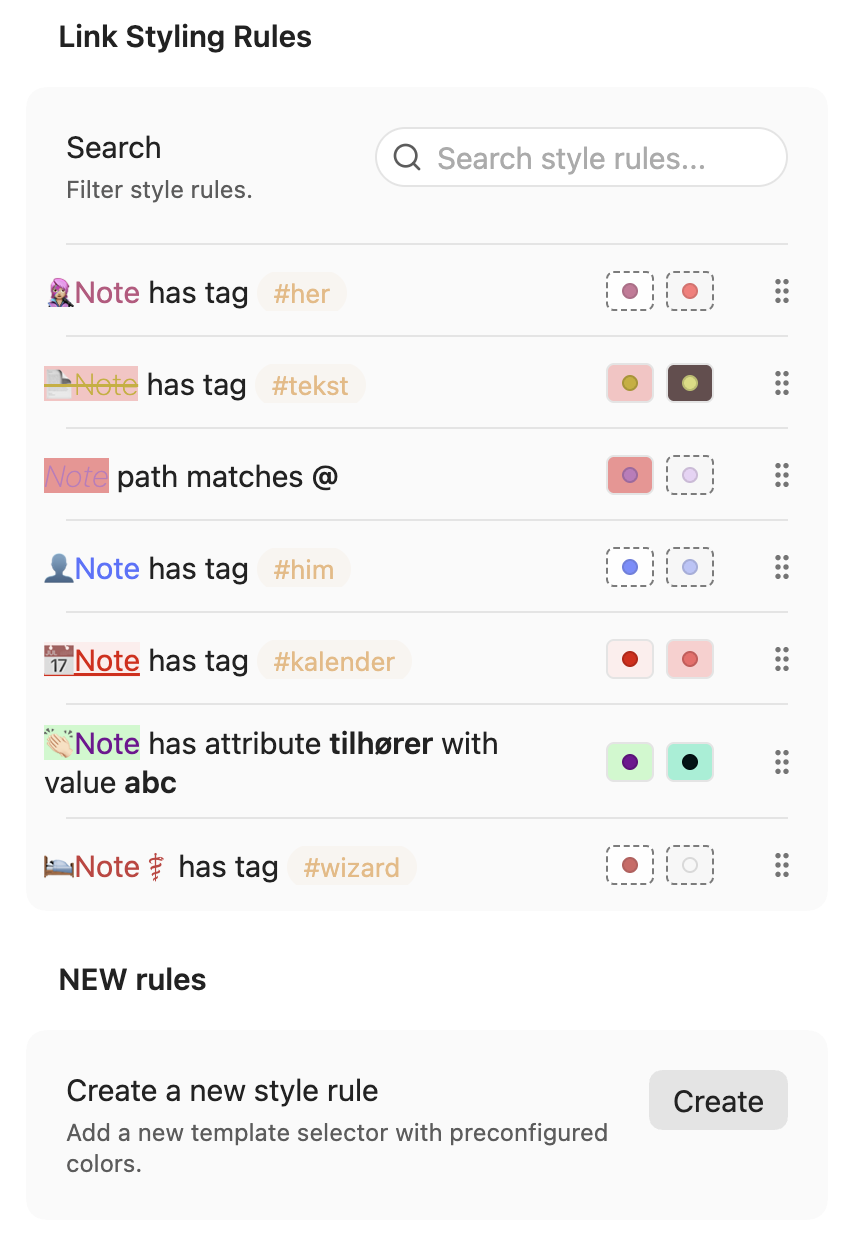
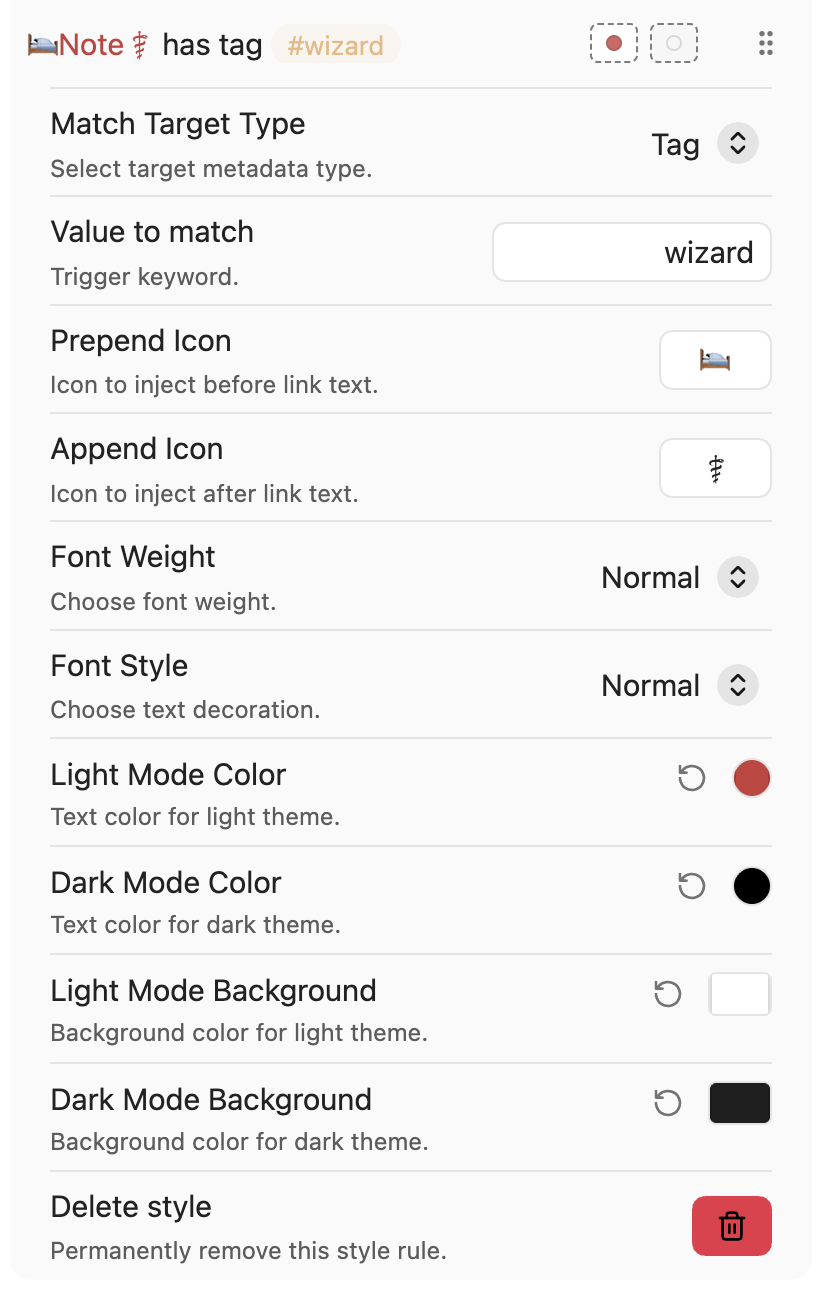 ---
## Performance notes (honest version)
This plugin is built to be efficient, but performance always depends on vault size, active plugins, theme, and layout complexity.
What to expect:
- Good responsiveness in normal/large vaults.
- Better behavior than full-refresh styling loops.
- Still possible to hit bottlenecks in very mutation-heavy setups.
If something feels slow, open an issue with:
- vault size (roughly)
- active plugins (especially UI-heavy ones)
- reproduction steps
- profiler screenshots if possible
---
## Compatibility
- Obsidian desktop (primary target)
- Dataview integration is optional
- Designed to coexist with other UI plugins, but edge cases can happen
If a specific plugin/view conflicts, please report it.
---
## Known limitations
- Some third-party panes may need explicit observer selectors.
- Very aggressive layout/event churn can still cause extra work.
- Rule-heavy setups may require tuning over time.
---
## Contributing
PRs and issues are welcome.
Helpful contributions:
- Reproducible bug reports
- Performance traces
- View compatibility fixes
- Refactors that improve readability without changing behavior
Please include before/after behavior when proposing changes.
---
## Credits
- Original **Supercharged Links** concept and community groundwork
- Obsidian plugin ecosystem maintainers and testers
---
## License
MIT — see [LICENSE](https://github.com/CarlB01/re-supercharged-links/blob/master/LICENSE).
---
## Performance notes (honest version)
This plugin is built to be efficient, but performance always depends on vault size, active plugins, theme, and layout complexity.
What to expect:
- Good responsiveness in normal/large vaults.
- Better behavior than full-refresh styling loops.
- Still possible to hit bottlenecks in very mutation-heavy setups.
If something feels slow, open an issue with:
- vault size (roughly)
- active plugins (especially UI-heavy ones)
- reproduction steps
- profiler screenshots if possible
---
## Compatibility
- Obsidian desktop (primary target)
- Dataview integration is optional
- Designed to coexist with other UI plugins, but edge cases can happen
If a specific plugin/view conflicts, please report it.
---
## Known limitations
- Some third-party panes may need explicit observer selectors.
- Very aggressive layout/event churn can still cause extra work.
- Rule-heavy setups may require tuning over time.
---
## Contributing
PRs and issues are welcome.
Helpful contributions:
- Reproducible bug reports
- Performance traces
- View compatibility fixes
- Refactors that improve readability without changing behavior
Please include before/after behavior when proposing changes.
---
## Credits
- Original **Supercharged Links** concept and community groundwork
- Obsidian plugin ecosystem maintainers and testers
---
## License
MIT — see [LICENSE](https://github.com/CarlB01/re-supercharged-links/blob/master/LICENSE).