
Draft Bench

**A writing workflow for Obsidian.** Manage projects, scenes, and versioned drafts in plain markdown, with flexible folder structure and native compatibility with Obsidian Bases. Draft Bench is inspired by [Longform](https://github.com/kevboh/longform), with added emphasis on per-scene draft history as first-class files, rich metadata via frontmatter, and a compile system that requires no JavaScript knowledge.

> **Status:** 0.6.4 โ€” current release. The full V1 feature set has shipped, plus extensions: sub-scene note type (0.2.0); Manuscript Builder Preview tab (0.3.0), dockable Manuscript Builder leaf (0.3.1), mobile support (0.3.2; Android verified, iOS / iPadOS untested), Builder-aligned Manuscript leaf restyle (0.3.3); Manuscript view Continuous mode (0.4.0); Scrivener 3 project importer (0.5.0-0.5.2); five-phase architectural audit (0.5.3); status-based scene-archive workflow (0.5.4); build-provenance attestations on every release asset (0.5.5); frontmatter type-narrowing refactor (0.6.0); scanner-hygiene patch eliminating IE-era polyfill literals from transitive dependencies (0.6.1); fflate migration replacing jszip's UMD module-detection code (0.6.2); `:has()` rewrite to sibling-combinator rules in the status-chip filter (0.6.3); postinstall patches plus production minification dropping `main.js` below the 5 MB Sync Standard threshold (0.6.4). API and data shape may still adjust between minor versions during the 0.x phase. See [VERSIONING.md](VERSIONING.md), the [CHANGELOG](CHANGELOG.md), or the [Release History wiki page](https://github.com/banisterious/obsidian-draft-bench/wiki/Release-History) for full detail. ## What it is - **Frontmatter-native.** Every project, scene, and draft is a plain markdown file with `dbench-*` properties. No index files, no parallel JSON stores. The vault *is* the database. - **Versioned per-scene drafts.** Each "new draft" command snapshots a scene's current prose into its own file, carries the working draft forward, and lets you keep revising. Every prior draft remains a real file, openable in split panes for side-by-side comparison. - **Flexible folder structure.** Scenes can live anywhere in your vault; the plugin identifies them by frontmatter, not folder location. Organize by status, POV, date, or any other scheme; nothing breaks. - **Obsidian Bases compatible.** Every property is Bases-queryable out of the box. Build manuscript tables, status queues, and corkboards without custom configuration. - **Compile without JavaScript.** A form-based Manuscript Builder handles compile presets, scene selection, and multi-format export (Markdown, ODT, PDF, DOCX). - **Compile preview, in-place.** A Preview tab renders the current preset's output as continuous read-only prose, no real export file needed. Dock the Builder as a workspace tab to keep Preview pinned next to a scene you're editing; Preview re-renders as you save. - **Scrivener 3 import.** A multi-step wizard reads a `.scriv` bundle from inside your vault and produces a fresh Draft Bench project: chapters, scenes, sub-scenes, drafts (optional), inspector content (synopses, notes, comments, footnotes, keywords), and custom metadata. Cross-platform; works on every OS Draft Bench itself supports. See [Importing from Scrivener](https://github.com/banisterious/obsidian-draft-bench/wiki/Importing-from-Scrivener).
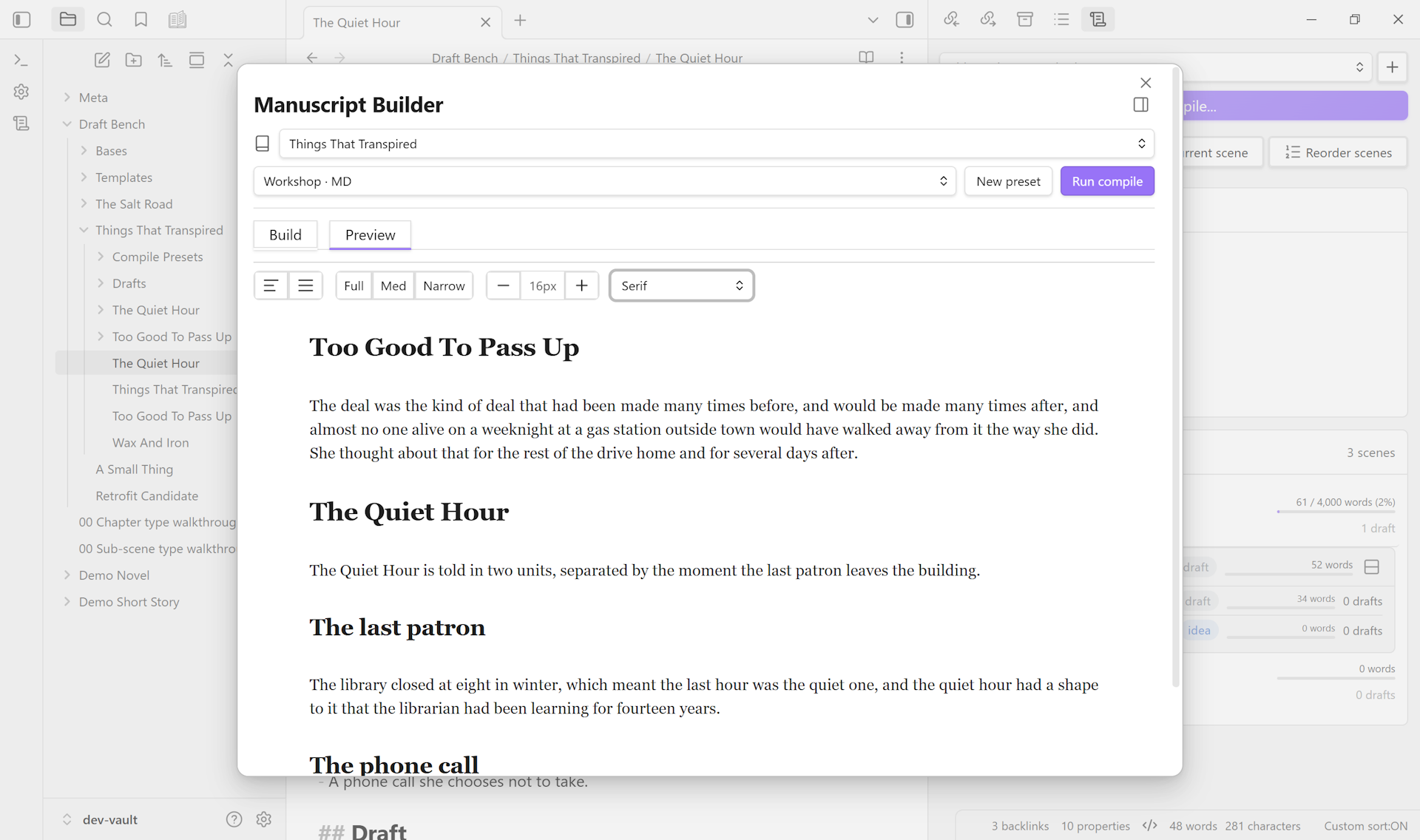
The Manuscript Builder modal with the Preview tab active. The sticky header shows the project picker, preset picker (Workshop ยท MD), New preset button, and Run compile button. A typography toolbar above the rendered prose shows text-alignment, reading-width (Med selected), font-size stepper (16px), and font-family dropdown (Serif). Below, three chapter-style headings render as continuous prose with the manuscript's content.

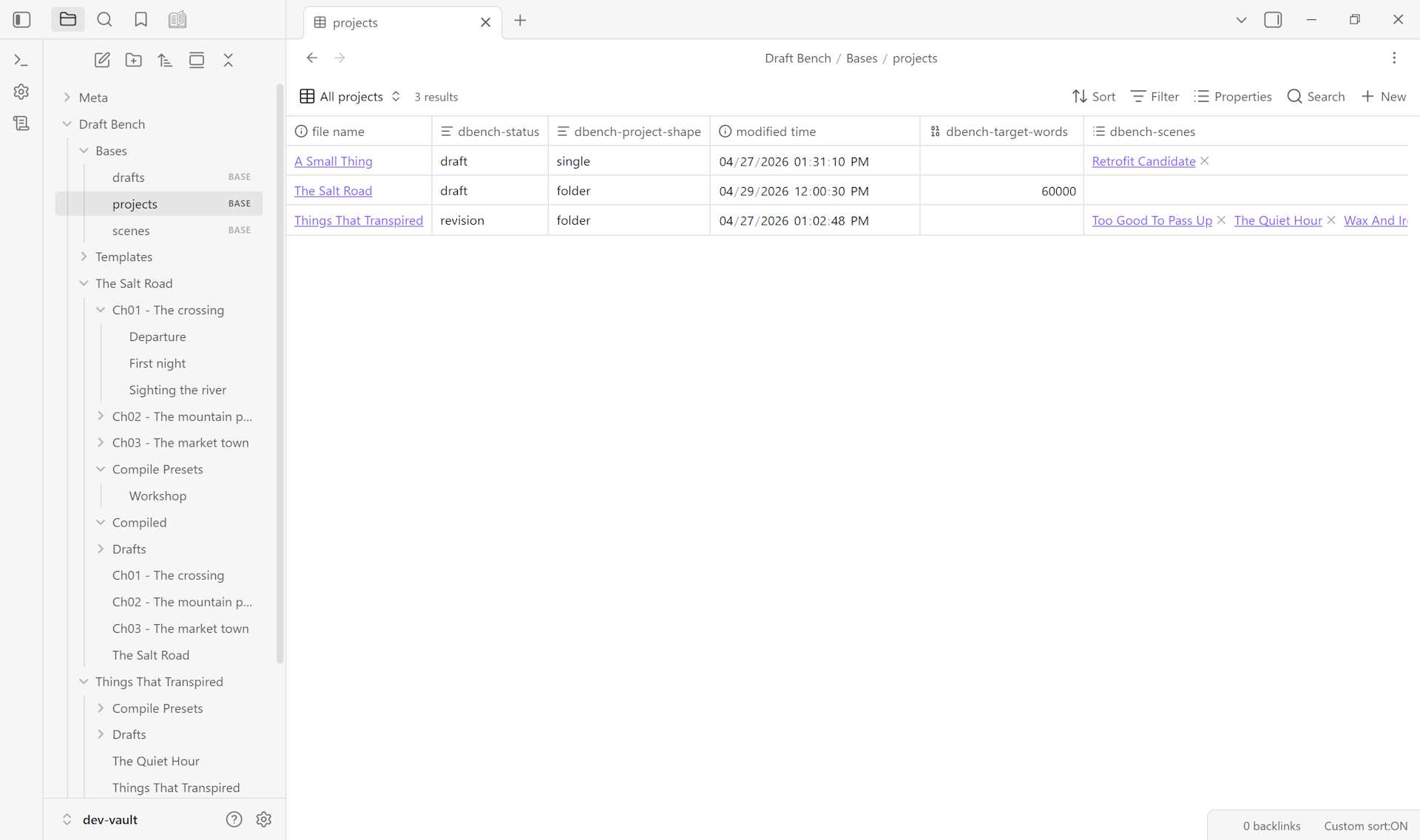
A starter Bases view in Draft Bench showing the projects table โ€” title, status, scene count, target word count, and progress bar columns โ€” populated with three example projects.

## Installation ### From Community Plugins (Recommended) Click [Install in Obsidian](obsidian://show-plugin?id=draft-bench) on the plugin's Community page, or search for "Draft Bench" in Obsidian Settings -> Community plugins. ### Using BRAT (Beta access) For early access to releases before they reach the Community Plugins directory: 1. Install [BRAT](https://github.com/TfTHacker/obsidian42-brat) from Community Plugins 2. Run command: `BRAT: Add a beta plugin for testing` 3. Enter: `https://github.com/banisterious/obsidian-draft-bench` 4. Enable Draft Bench in Settings -> Community Plugins ### Manual Installation 1. Download from [Releases](https://github.com/banisterious/obsidian-draft-bench/releases) 2. Extract to `/.obsidian/plugins/draft-bench/` 3. Reload Obsidian and enable the plugin See [Getting Started](https://github.com/banisterious/obsidian-draft-bench/wiki/Getting-Started) for the first-project walkthrough. ## Documentation User documentation lives at the [GitHub Wiki](https://github.com/banisterious/obsidian-draft-bench/wiki). Developer and design documentation is in the repo: - [Specification](docs/planning/specification.md): plugin features and behavior. - [UI/UX Reference](docs/planning/references/ui-reference.md): component patterns adapted from Charted Roots. - [Coding Standards](docs/developer/coding-standards.md): TypeScript and CSS conventions. - [Code Architecture](docs/developer/architecture.md): `src/` layout and layering. ## Community & Support - [Report a bug or request a feature](https://github.com/banisterious/obsidian-draft-bench/issues) - [GitHub Discussions](https://github.com/banisterious/obsidian-draft-bench/discussions) - [Release notes](https://github.com/banisterious/obsidian-draft-bench/releases) ## Non-goals Draft Bench is deliberately not an AI writing assistant, a grammar checker, a text-editor replacement, a collaboration tool, or a submission tracker. It provides structural and workflow scaffolding; the words are yours. See [the specification](docs/planning/specification.md) for the full list. ## License [MIT](LICENSE.md).