# Typst Mate


 Render math expressions in [Obsidian](https://obsidian.md) using [Typst](https://typst.app/) instead of MathJax.
[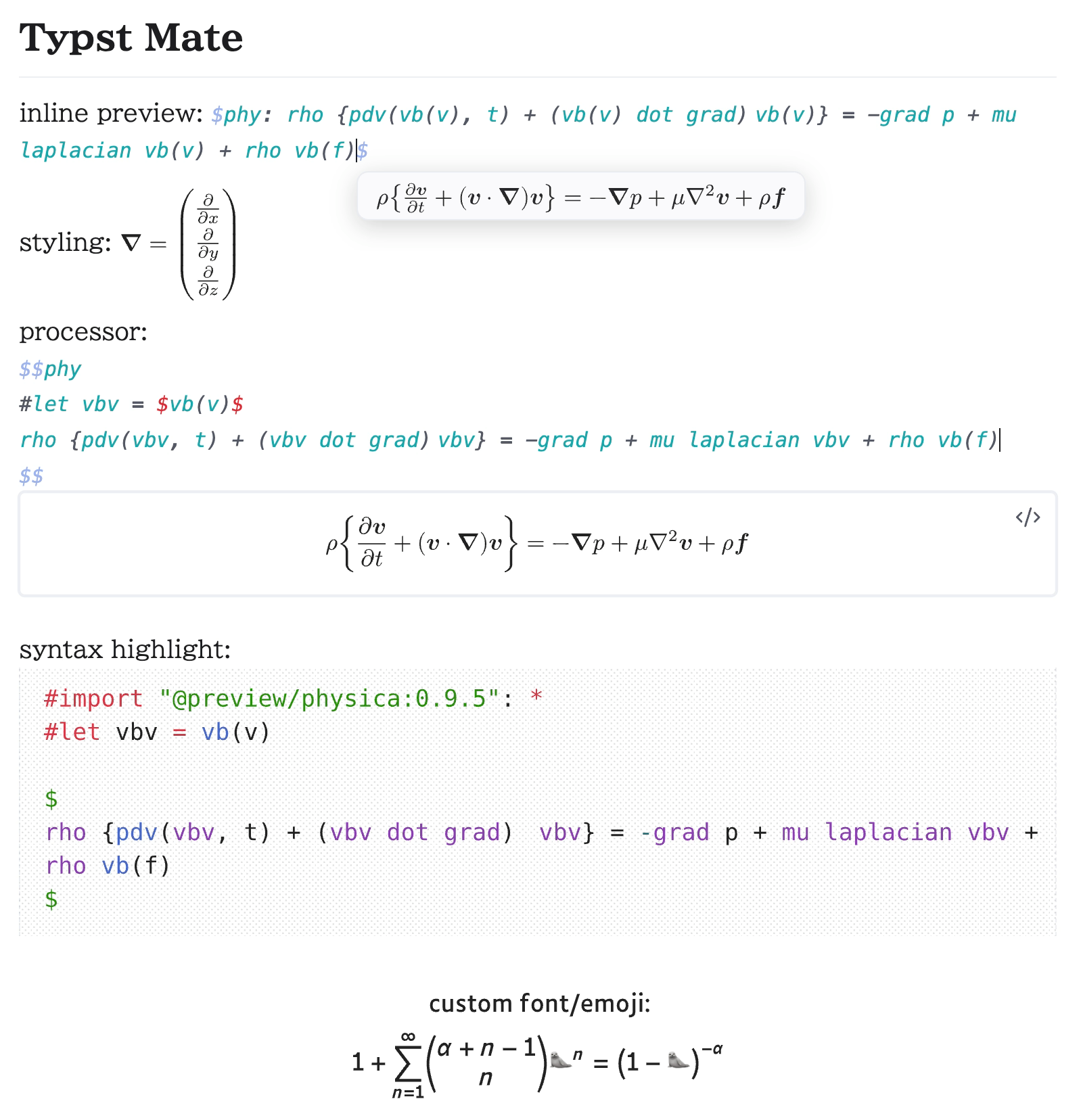](#demo)
[](#symbol-suggest)
Snippet | Script
:-----------------------:|:------------------------:
[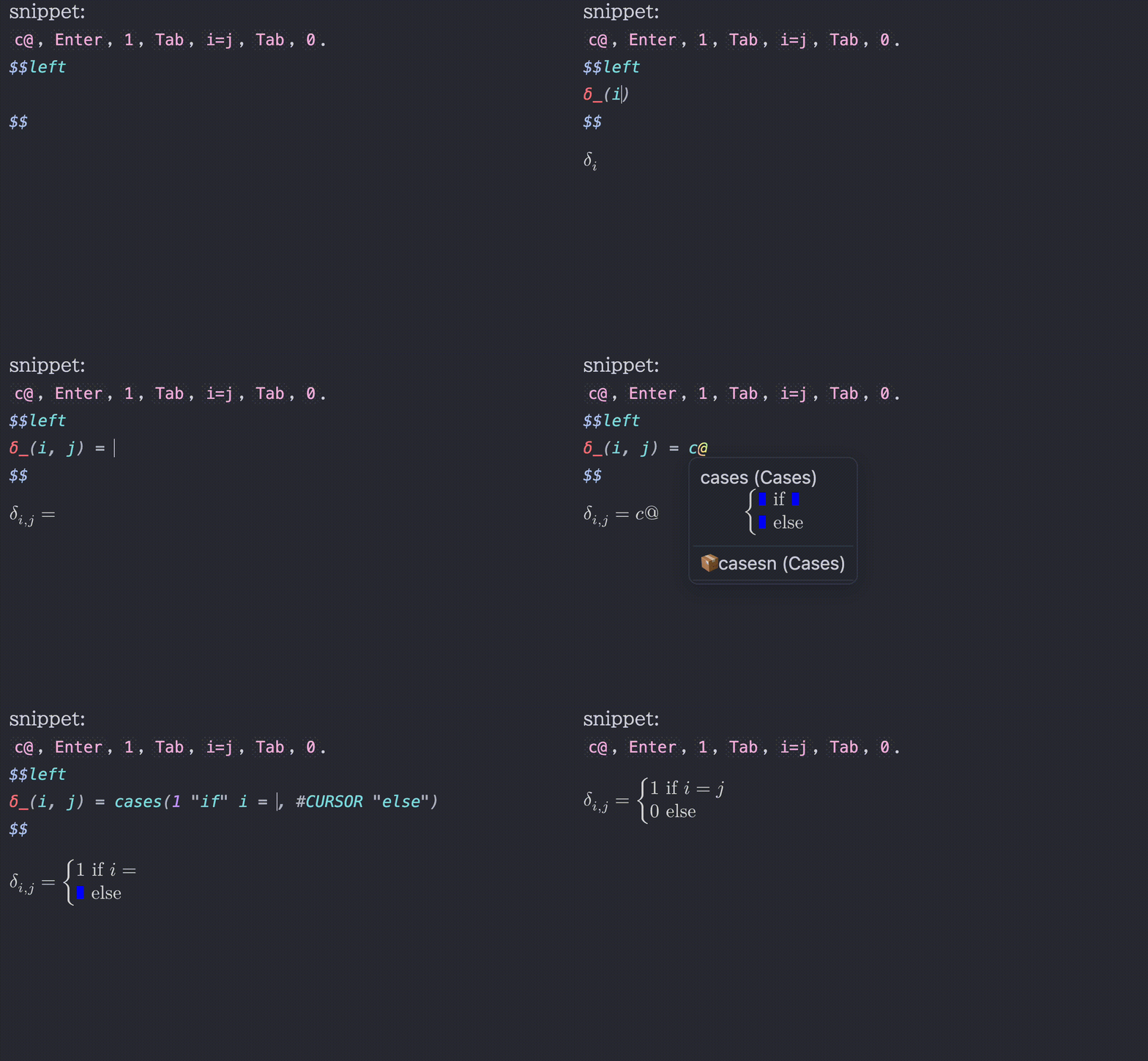](#snippet) | [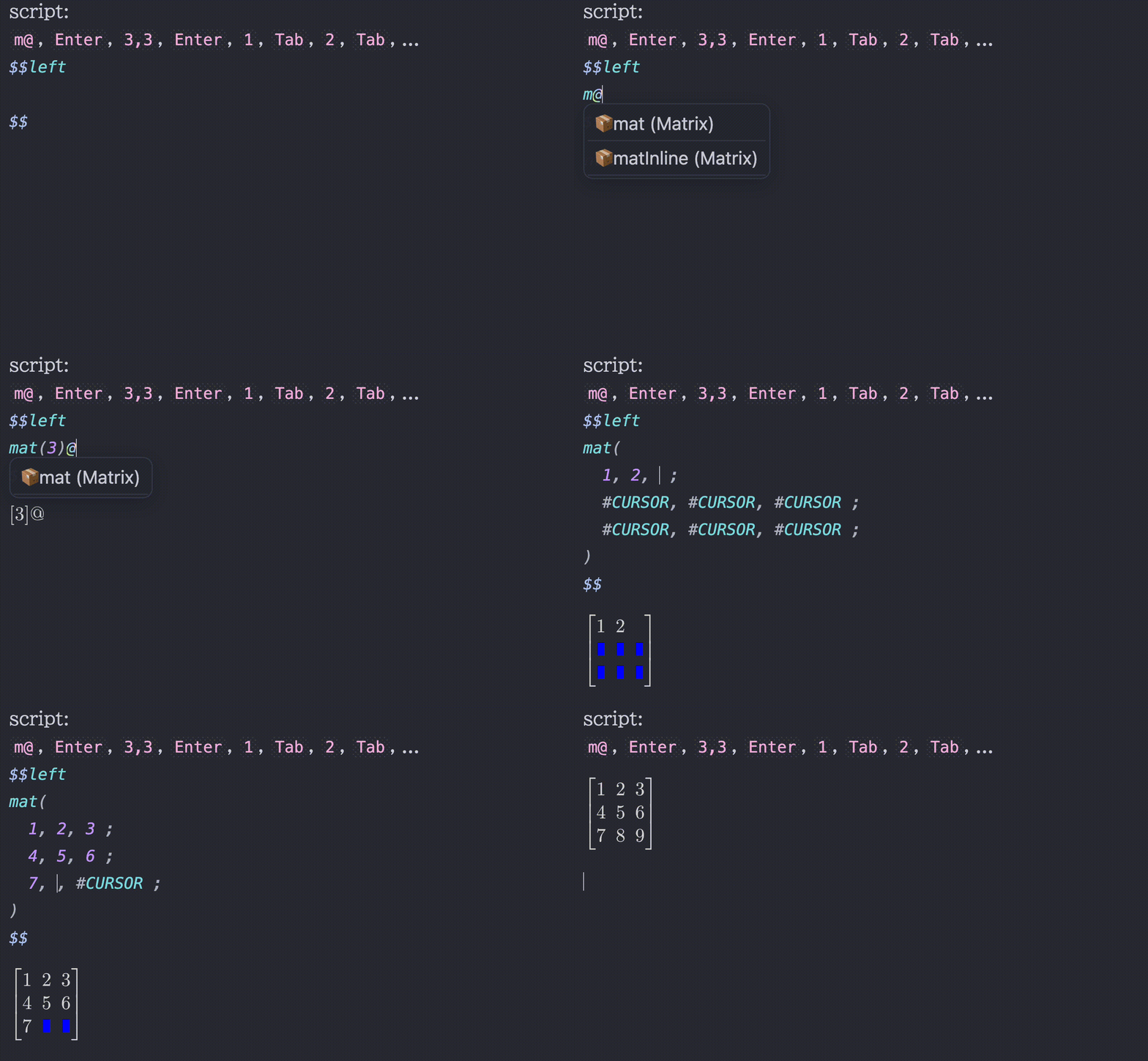](#script-snippet)
For details, refer to the [Documentation](#documentation) section below.
I welcome [Discussions](https://github.com/azyarashi/obsidian-typst-mate/discussions/categories/show-and-tell) featuring your wonderful snippets!
Are you an Obsidian LaTeX Suite user? Check out [this guide](docs/obsidian-latex-suite-migration.md), or if you want to use only Typst codeblocks, check out [this issue](https://github.com/azyarashi/obsidian-typst-mate/issues/8).
> [!NOTE]
> For a smoother experience, some values are different from (or added to) standard Typst defaults. (e.g. `datetime`, `smallcaps`, `fontsize`, and `CURSOR`)
> See the [notes here](docs/processor#notes) for details.
---
## Features
- Support *inline math*, *display math*, and *code blocks*
- Support **preamble** and **templates** (called processors)
- **Linter**
- **`.typ` View**
- **Bracket Jump**
- **Typst Shortcut**
- **Snippets** / **Scripts**
- **Bracket highlights**
- **Symbol completion**
- Type a leading backslash `\` to make the search look for LaTeX commands
- **Inline math preview** / **Codeblock preview**
- **Available on mobile app**
- Support **background rendering**
- Use **font size** from Obsidian settings
- Inherit **text color** from Obsidian theme
- **Additional styling customization**
- e.g., an option `inline-middle` to vertically center *inline math* so it lines up naturally with the surrounding text
- Use **custom fonts** and import system fonts (desktop app only for importing)
- Almost all[^1] **Typst packages** are supported (desktop app only for importing local packages)
- **Tables and blockquotes support** with proper display math handling (`
Render math expressions in [Obsidian](https://obsidian.md) using [Typst](https://typst.app/) instead of MathJax.
[](#demo)
[](#symbol-suggest)
Snippet | Script
:-----------------------:|:------------------------:
[](#snippet) | [](#script-snippet)
For details, refer to the [Documentation](#documentation) section below.
I welcome [Discussions](https://github.com/azyarashi/obsidian-typst-mate/discussions/categories/show-and-tell) featuring your wonderful snippets!
Are you an Obsidian LaTeX Suite user? Check out [this guide](docs/obsidian-latex-suite-migration.md), or if you want to use only Typst codeblocks, check out [this issue](https://github.com/azyarashi/obsidian-typst-mate/issues/8).
> [!NOTE]
> For a smoother experience, some values are different from (or added to) standard Typst defaults. (e.g. `datetime`, `smallcaps`, `fontsize`, and `CURSOR`)
> See the [notes here](docs/processor#notes) for details.
---
## Features
- Support *inline math*, *display math*, and *code blocks*
- Support **preamble** and **templates** (called processors)
- **Linter**
- **`.typ` View**
- **Bracket Jump**
- **Typst Shortcut**
- **Snippets** / **Scripts**
- **Bracket highlights**
- **Symbol completion**
- Type a leading backslash `\` to make the search look for LaTeX commands
- **Inline math preview** / **Codeblock preview**
- **Available on mobile app**
- Support **background rendering**
- Use **font size** from Obsidian settings
- Inherit **text color** from Obsidian theme
- **Additional styling customization**
- e.g., an option `inline-middle` to vertically center *inline math* so it lines up naturally with the surrounding text
- Use **custom fonts** and import system fonts (desktop app only for importing)
- Almost all[^1] **Typst packages** are supported (desktop app only for importing local packages)
- **Tables and blockquotes support** with proper display math handling (`
` and `\n[\s\t]*>` will be automatically replaced with line breaks)
- [Excalidraw](https://www.obsidianstats.com/plugins/obsidian-excalidraw-plugin) integration
- [Equation Citator](https://github.com/FRIEDparrot/obsidian-equation-citator) integration
- [No more flickering inline math](https://www.obsidianstats.com/plugins/inline-math) compatibility
- PDF Export, [Better Export PDF](https://www.obsidianstats.com/plugins/better-export-pdf), [Export Image plugin](https://www.obsidianstats.com/plugins/obsidian-export-image), and [Webpage HTML Export](https://www.obsidianstats.com/plugins/webpage-html-export) compatibility
- Typst Tools
- Symbols viewer
- Packages viewer
- Snippets editor
- Typst handwritten symbol recognition with [Detypify](https://github.com/QuarticCat/detypify)
- Bidirectional converter between TeX/LaTeX and Typst with [TyLax](https://github.com/scipenai/tylax)
- Commutative diagram editor with [Quiver](https://github.com/varkor/quiver)
- Context Menu
- Copy as SVG (Obsidian Theme / Typst Default)
- Copy as PNG (Transparent / Opaque)
- Copy as img tag (for embedding into Obsidian notes)
- Support 'click to jump' (experimental)
- Click codeblock output
- Click math output with ctrl
[^1]: [jlyfish](https://typst.app/universe/package/jlyfish/) probably won't work correctly.
For a better typing experience, I **strongly** recommend installing the [No more flickering inline math](https://www.obsidianstats.com/plugins/inline-math) plugin by [RyotaUshio](https://github.com/RyotaUshio):
Turned OFF | Turned ON
:-----------------------:|:------------------------:
 | 
## Installation
You can install this plugin via the Community Plugins tab within Obsidian. Search for "Typst Mate". Alternatively, you can also install using [BRAT](https://obsidian.md/plugins?id=obsidian42-brat).
[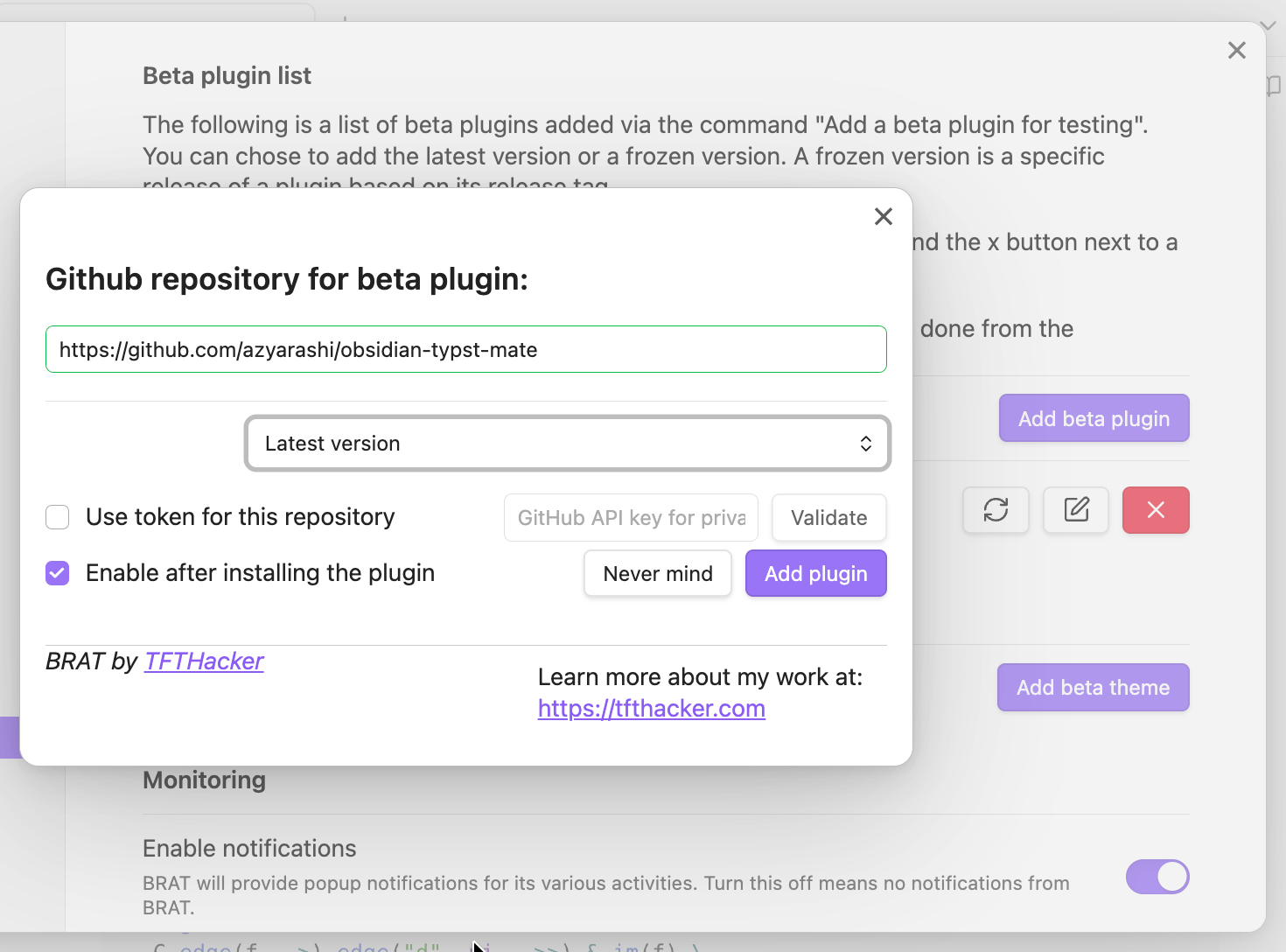](#install-with-brat)
## Documentation
- [**Processor**](docs/processor/README.md) - Customize rendering with preambles, templates, and styling
- [**Snippets**](docs/snippets/README.md) - Auto-expanding shortcuts for math input
- [Cases](docs/snippets/Cases.md) / [Matrix](docs/snippets/Matrix.md)
- [**Shortcuts**](docs/Shortcuts.md) - Wrap selected text in Typst functions (e.g. `sqrt`, `bold`)
- [**Tab Jump**](docs/TabJump.md) - Navigate through math content with Tab
- [**Commands**](docs/Commands.md) - Available commands and actions
- [**Migrating from LaTeX Suite**](docs/obsidian-latex-suite-migration.md) - Guide for Obsidian LaTeX Suite users
## Compatibility
### Official Features
- PDF Export
### Community Plugins
- [Excalidraw](https://www.obsidianstats.com/plugins/obsidian-excalidraw-plugin) (use the `typst-render-to-excalidraw` command)
- [Equation Citator](https://github.com/FRIEDparrot/obsidian-equation-citator) (`Advanced Settings` > `Enable Typst Mode` > reload the plugin)
- [Markmind](https://www.obsidianstats.com/plugins/obsidian-markmind)
- [No more flickering inline math](https://www.obsidianstats.com/plugins/inline-math)
- [Better Export PDF](https://www.obsidianstats.com/plugins/better-export-pdf)
- [Export Image plugin](https://www.obsidianstats.com/plugins/obsidian-export-image)
- [Webpage HTML Export](https://www.obsidianstats.com/plugins/webpage-html-export) (don't forget to include CSS from Style Options and disable background rendering)
If the export doesn't work correctly, try disabling background rendering before exporting.
## Customization
### Default Preamble
```typst
#set page(margin: 0pt, width: auto, height: auto)
#show raw: set text(1.25em)
#set text(size: fontsize) // `fontsize` refers to the settings in Obsidian
#import "@preview/mannot:0.3.1": *
#import "@preview/quick-maths:0.2.1": shorthands
#show: shorthands.with(
($+-$, sym.plus.minus),
($|-$, math.tack),
)
// Typst 0.13.1 or before (plugin 2.1.7 or before)
// #let scr(it) = text(features: ("ss01",), box($cal(it)$))
```
### Custom Styling
You can apply your own custom CSS, not just the styling included in the plugin.
Depending on the three modes (`inline`, `display`, and `codeblock`), the styling method (`style`), and the identifier (`id`), the following CSS classes will be added:
- `typstmate-(mode)`
- `typstmate-style-(style)`
- `typstmate-id-(id)`
## Acknowledgements
Typst Mate leverages the following open-source projects:
- [Typst](https://typst.app/) - a modern and powerful typesetting system
- [TyLax](https://github.com/scipenai/tylax) - a fast and highly compatible LaTeX to Typst converter
- [Detypify](https://github.com/QuarticCat/detypify) - a tool for recognizing handwritten math symbols
- [Quiver](https://github.com/varkor/quiver) - a tool for creating commutative diagrams
- [unicode-math](https://github.com/latex3/unicode-math) - distributed under the [LaTeX Project Public License (LPPL) 1.3c](https://ctan.org/license/lppl1.3c).
and contributors:
- [Merrkry](https://github.com/merrkry)
- [BridgeSenseDev](https://github.com/BridgeSenseDev)
- [Batres3](https://github.com/Batres3)
- [phxinyang](https://github.com/phxinyang)
- [paq](https://github.com/paq)
I'm grateful to the developers for making this plugin possible!
---
## Disclosures
This section contains wording required for publishing on Obsidian's official Community Plugins page, so I include it here.
### Network
This plugin makes use of a large WebAssembly (Wasm) binary.
Bundling it directly would significantly increase startup time, so it is automatically downloaded from the [Releases](https://github.com/azyarashi/obsidian-typst-mate/releases) page instead.
Network access is required to install Typst packages, and is also required by Typst Tools to display lists of packages and symbols and to use Detypify and Quiver.
### Reading Local Files (Desktop App only)
If the cache for a given package cannot be found inside the Vault, this plugin will fall back to accessing the same local package files used by the Typst CLI.
For the exact locations, see [typst/README.md#local-packages](https://github.com/typst/packages/blob/main/README.md#local-packages).
## Planned Update Contents
See [Discussion#10](https://github.com/azyarashi/obsidian-typst-mate/discussions/10).