# NL2LaTeX
[](https://github.com/antodellarte/nl2latex-obsidian/actions/workflows/build.yml)

[](https://obsidian.md/)

🌍 **Choose Language / Scegli la lingua:**
- [🇬🇧 English Documentation](#english-documentation)
- [🇮🇹 Guida in Italiano](#italian-documentation)
### 📖 Table of Contents
- [✨ Features](#-features)
- [🚀 How to Use](#-how-to-use)
- [🧮 Supported Constructs](#-supported-constructs)
- [⚙️ Custom Regex Snippets](#️-custom-regex-snippets)
- [📥 Installation](#-installation)
- [🛠️ Building from Source](#️-building-from-source)
- [🤝 Contributions and License](#-contributions-and-license)
**NL2LaTeX** is an [Obsidian](https://obsidian.md/) plugin that allows you to write complex mathematical expressions in natural language (English and Italian) and convert them into formatted LaTeX code on the fly.
## ✨ Features
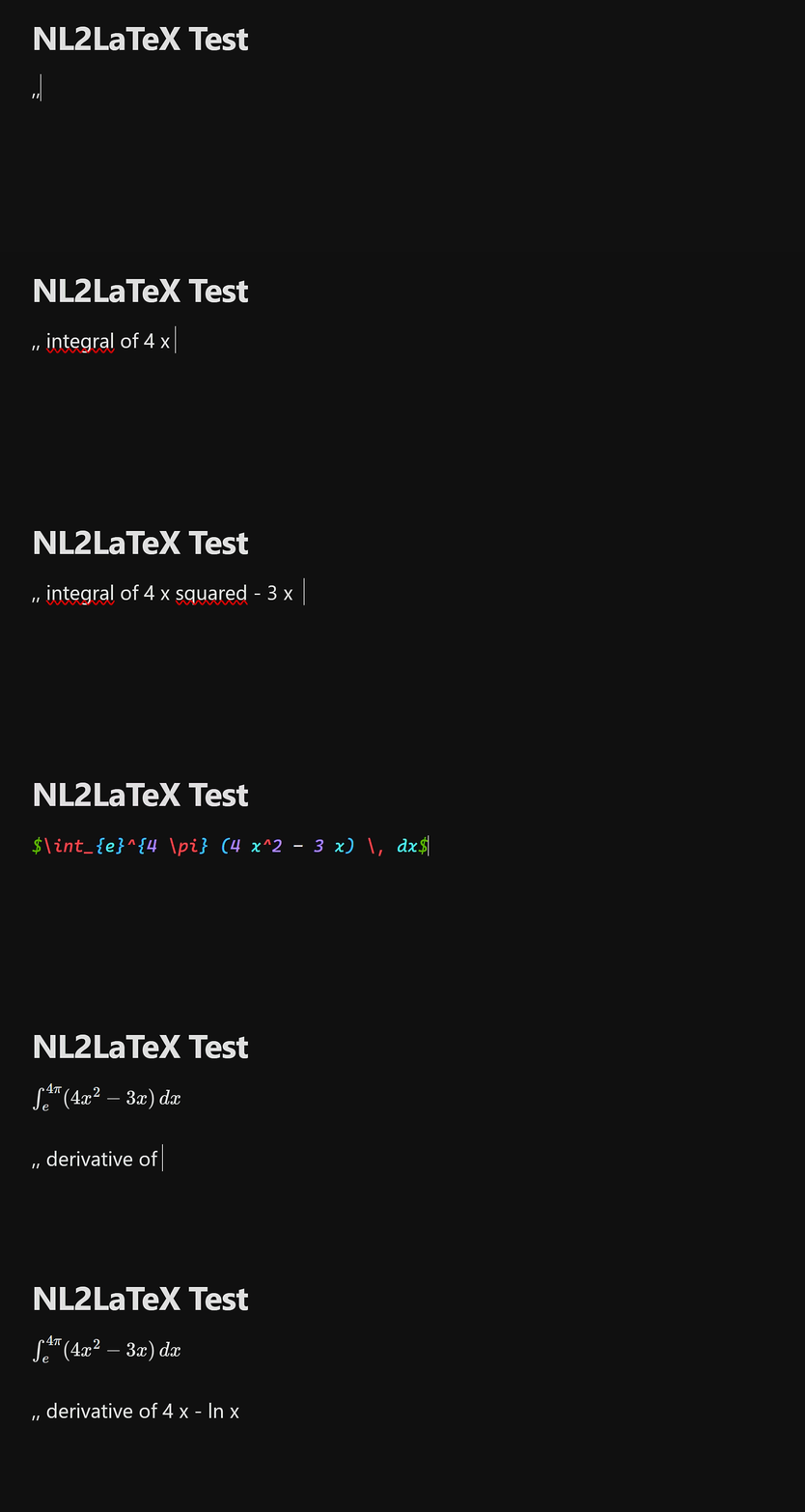
- **Natural Language Parsing:** Automatically understands spoken math like "integral of x", "limit as x approaches 0", or "square root of x".
- **Bilingual Support (EN/IT):** Mix and match English and Italian seamlessly (e.g., "integral of x squared" or "integrale di x al quadrato").
- **Auto-Conversion Markers:** Type your math between customizable markers (default `;;`) and watch it turn into LaTeX the moment you close them.
- **Custom Regex Snippets:** Build your own personal dictionary of shortcuts using JavaScript Regular Expressions.
- **Configurable Output:** Choose whether to wrap the generated LaTeX in inline (`$...$`), block (`$$...$$`), or no delimiters.
## 🚀 How to Use
### 1. Marker Auto-Conversion (Recommended)
By default, the plugin listens for the `;;` markers. Type your natural language expression between them. As soon as you type the closing `;;`, it converts automatically.
**Input:**
```text
;; integral of x squared from 0 to pi ;;
```
**Output:**
```latex
$\int_{0}^{\pi} (x)^2 \, dx$
```
### 2. Selection Conversion
Select any standard text in your note, open the Command Palette (`Ctrl/Cmd + P`), and run **NL2LaTeX: Convert selection to LaTeX**. You can also assign a custom hotkey to this command in Obsidian's settings.
## 🧮 Supported Constructs
The parser understands standard math vocabulary and groups them logically. Here are some examples of what you can type:
|Construct|English Example|Italian Example|Output|
|---|---|---|---|
|**Integrals**|`integral of x from A to B`|`integrale di x da A a B`|`\int_{A}^{B} x \, dx`|
|**Derivatives**|`derivative of x with respect to y`|`derivata di x rispetto a y`|`\frac{d}{dy}(x)`|
|**Limits**|`limit of x as y approaches 0`|`limite di x per y che tende a 0`|`\lim_{y \to 0} x`|
|**Sums**|`sum of x from n = 1 to 10`|`sommatoria di x da n = 1 a 10`|`\sum_{n=1}^{10} x`|
|**Roots**|`square root of x`, `3rd root of x`|`radice quadrata di x`, `radice di ordine 3 di x`|`\sqrt{x}`, `\sqrt[3]{x}`|
|**Powers**|`x squared`, `x cubed`, `x to the power of n`|`x al quadrato`, `x al cubo`, `x elevato a n`|`(x)^2`, `(x)^3`, `(x)^{n}`|
|**Greek Letters**|`alpha`, `beta`, `gamma`, `omega`...|`alfa`, `beta`, `gamma`, `omega`...|`\alpha`, `\beta`, `\gamma`, `\omega`|
|**Logic/Relations**|`x implies y`, `for all x`, `x and y`|`x implica y`, `per ogni x`, `x e logico y`|`x \implies y`, `\forall x`, `x \land y`|
_Note: You can combine operators naturally, like `sin of x plus cos of y divided by 2`._
## ⚙️ Custom Regex Snippets
If you use specific notations frequently, you can add your own Regex rules in the plugin settings. These snippets are processed _before_ the natural language engine.
**Example:**
- **Label:** Vectors
- **Pattern:** `vector (?:of )?([a-zA-Z0-9]+)`
- **Replacement:** `\vec{$1}`
Now, typing `vector of v` will instantly convert to `\vec{v}`.
## 📥 Installation
### Manual Installation (from [Releases](https://github.com/antodellarte/nl2latex-obsidian/releases))
1. Go to the Releases page of this repository.
2. Download the `main.js` and `manifest.json` files from the latest release.
3. Create a folder named `nl2latex-obsidian` inside your vault's `.obsidian/plugins/` directory.
4. Place both downloaded files into that folder.
5. Reload Obsidian and enable the plugin in **Settings > Community Plugins**.
## 🛠️ Building from Source
If you want to compile the plugin yourself or contribute to the development, follow these steps:
1. **Prerequisites:** Ensure you have [Node.js](https://nodejs.org/) and npm installed on your machine.
2. **Clone the repository:**
```bash
git clone https://github.com/antodellarte/nl2latex-obsidian.git
cd nl2latex-obsidian
```
3. **Install dependencies:**
```bash
npm install
```
4. **Compile the plugin:**
```bash
npm run build
```
5. **Result:** The compilation will create a `build/` folder containing the ready-to-use `main.js` and `manifest.json` files. Copy this folder into your Obsidian vault under `.obsidian/plugins/` to test your local build.
## 🤝 Contributions and License
Any bug reports or Pull Requests are welcome! The project is distributed under the **MIT** license.
# 🇮🇹 Guida in Italiano
### 📖 Indice
- [✨ Caratteristiche](#-caratteristiche-principali)
- [🚀 Utilizzo](#-utilizzo)
- [🧮 Costrutti supportati](#-supported-constructs)
- [⚙️ Snippet Personalizzati](#️-snippet-personalizzati)
- [📥 Installazione](#installazione-manuale)
- [🛠️ Compilando da source](#️-compilando-da-source)
- [🤝 Contibuzione e Licenza](#-contributi-e-licenza)
**NL2LaTeX** è un plugin [Obsidian](https://obsidian.md/) che consente di scrivere espressioni matematiche complesse in linguaggio naturale (inglese e italiano) e convertirle al volo in codice LaTeX formattato.
## ✨ Caratteristiche Principali
- **Supporto Bilingue Nativo:** Il motore di conversione comprende sia l'italiano che l'inglese, permettendoti anche di mescolarli (es. "integrale di x squared").
- **Conversione al volo:** Digita la tua formula tra due marcatori personalizzabili (di default `;;`) e il plugin la trasformerà in LaTeX non appena digiti il marcatore di chiusura.
- **Snippet Regex Personalizzati:** Crea scorciatoie su misura utilizzando le espressioni regolari (RegEx) direttamente dalle impostazioni del plugin.
- **Stile Flessibile:** Scegli se racchiudere l'output in blocchi inline (`$...$`), blocchi isolati (`$$...$$`) o senza alcun delimitatore.
## 🚀 Utilizzo
### 1. Conversione Automatica (Consigliata)
Usa i marcatori di conversione rapida. Digita l'espressione in linguaggio naturale e chiudi con i marcatori.
**Cosa scrivi:**
```text
;; integrale di x al quadrato da 0 a pi greco ;;
```
**Cosa ottieni:**
```latex
$\int_{0}^{\pi} (x)^2 \, dx$
```
### 2. Conversione da Selezione
Evidenzia un testo qualsiasi, apri il riquadro dei comandi di Obsidian (`Ctrl/Cmd + P`) e cerca **NL2LaTeX: Convert selection to LaTeX**. Puoi anche assegnare una scorciatoia da tastiera personalizzata a questo comando.
## ⚙️ Snippet Personalizzati
Nelle impostazioni del plugin puoi aggiungere regole personalizzate che hanno la priorità sul motore di traduzione standard.
Ad esempio, se vuoi una scorciatoia veloce per i vettori:
- **Etichetta:** Vettore
- **Pattern Regex:** `vettore (?:di )?([a-zA-Z0-9]+)`
- **Sostituzione:** `\vec{$1}`
In questo modo, scrivendo `vettore di v` oppure `vettore x`, il testo verrà convertito rispettivamente in `\vec{v}` e `\vec{x}`.
## 📥 Installazione manuale (da [Releases](https://github.com/antodellarte/nl2latex-obsidian/releases))
1. Visita la pagina [Releases](https://github.com/antodellarte/nl2latex-obsidian/releases) di questo repository.
2. Scarica i file `main.js` e `manifest.json` dall'ultima versione disponibile.
3. Crea una cartella chiamata `nl2latex-obsidian` dentro il percorso `.obsidian/plugins/` del tuo vault.
4. Inserisci i due file scaricati all'interno della cartella.
5. Riavvia Obsidian e attiva il plugin da **Impostazioni > Plugin della community**.
## 🛠️ Compilando da source
Se vuoi compilare autonomamente il plugin o contribuire allo sviluppo, segui questi passaggi:
1. **Requisiti:** Assicurati che [Node.js](https://nodejs.org/) e **npm** siano installati correttamente sul tuo dispositivo.
2. **Clona la repository:**
```bash
git clone https://github.com/antodellarte/nl2latex-obsidian.git
cd nl2latex-obsidian
```
3. **Installa le dependencies:**
```bash
npm install
```
4. **Compila il plugin:**
```bash
npm run build
```
5. **Risultato:** Il compilatore creerà una cartella `build/` contenete i file `main.js` e `manifest.json` pronti all'uso. Copia questa cartella nel tuo vault Obsidian in `.obsidian/plugins/` per testare la tua build locale.
## 🤝 Contributi e Licenza
Eventuali segnalazioni di bug o Pull Request sono i benvenuti! Il progetto è distribuito sotto licenza **MIT**.