# LaTeX and TikZ Renderer for Obsidian
[](https://github.com/agostino-code/obsidian-tikz/releases)
[](https://opensource.org/licenses/MIT)
[](https://obsidian.md)
Render **any LaTeX and TikZ diagram** directly inside your [Obsidian](https://obsidian.md) notes using your **local LaTeX installation** (`latex`, `dvisvgm`).
Unlike WebAssembly-based solutions with limited package support, this plugin invokes your system's native TeX distribution. This means you can use **any package installed on your computer** — including `pgfplots`, `circuitikz`, `chemfig`, `tikz-cd`, `forest`, `quantikz`, and more!
---
## ✨ Features
- ⚡ **Zero-boilerplate Snippets**: Directly write `\begin{tikzpicture} ... \end{tikzpicture}`. The plugin automatically wraps it with a customizable standalone preamble.
- 📜 **Full Document Support**: Write full standalone documents with custom `\documentclass`, packages, and macros.
- 📦 **Unlimited Package Ecosystem**: Use any package installed on your local TeX distribution (`MiKTeX`, `TeX Live`, `MacTeX`).
- 🌓 **Smart Dark Mode Theming**: Automatically adapts black/white lines, text, and axes to your active Obsidian theme.
- 💾 **Fast Persistent Cache**: Diagrams are compiled to vector SVG and cached via IndexedDB. Re-opening notes is instant.
- 🛠️ **Built-in Diagnostics**: One-click **"Test Toolchain"** button in settings to verify your compiler and `dvisvgm` setup.
- ⏱️ **Process Timeout & Clear Error Logs**: Prevents infinite macro loops from freezing Obsidian and displays highlighted LaTeX error messages with expandable full logs.
---
## 📋 Prerequisites
Because this plugin executes your local compiler, you must have the following tools installed and accessible in your system's `PATH`:
1. **A LaTeX distribution**:
- **Windows**: [MiKTeX](https://miktex.org/) or [TeX Live](https://tug.org/texlive/)
- **macOS**: [MacTeX](https://tug.org/mactex/) or [BasicTeX](https://tug.org/mactex/morepackages.html)
- **Linux**: TeX Live (`sudo apt install texlive-full` or `texlive-base texlive-pstricks dvisvgm`)
2. **`dvisvgm`** (included by default in MiKTeX, TeX Live, and MacTeX).
> **Tip:** You can check if they are available in your terminal by running:
> ```bash
> latex --version
> dvisvgm --version
> ```
---
## 🚀 Installation
### From Obsidian Community Plugins (Recommended)
1. In Obsidian, open **Settings** → **Community plugins**.
2. Turn off **Restricted mode** if prompted.
3. Click **Browse** and search for **"LaTeX and TikZ Renderer"** (or `latex-tikz-renderer`).
4. Click **Install**, then **Enable**.
### Via BRAT (for beta releases)
1. Install the [Obsidian BRAT](https://github.com/TfTHacker/obsidian-brat) plugin.
2. In BRAT settings, click **Add Beta plugin**.
3. Enter `agostino-code/obsidian-tikz`.
### Manual Installation
1. Download `main.js`, `manifest.json`, and `styles.css` from the latest [Release](https://github.com/agostino-code/obsidian-tikz/releases).
2. Inside your vault, navigate to `.obsidian/plugins/` and create a folder named `latex-tikz-renderer`.
3. Copy the downloaded files into `.obsidian/plugins/latex-tikz-renderer/`.
4. In Obsidian, reload plugins and enable **LaTeX and TikZ Renderer**.
---
## ⚙️ Configuration
In Obsidian **Settings** → **LaTeX and TikZ Renderer**:
| Setting | Default | Description |
| :--- | :--- | :--- |
| **LaTeX Compiler Path** | `latex` | Executable name or absolute path to your compiler (e.g., `latex`, `pdflatex`, `xelatex`, or `C:\...\latex.exe`). |
| **dvisvgm Path** | `dvisvgm` | Executable name or absolute path to `dvisvgm`. |
| **Test Toolchain** | *Button* | Tests and displays version info for both the compiler and `dvisvgm`. |
| **Auto-wrap Snippets** | `true` | When enabled, code without `\documentclass` is automatically wrapped with the Default Preamble. |
| **Default Preamble** | `\documentclass[tikz, border=2pt]{standalone}...` | Preamble prepended to snippets. Add custom `\usepackage{...}` or macros here. |
| **Compilation Timeout** | `25` | Maximum seconds to wait before aborting a compile job. |
| **Invert dark colors in dark mode** | `true` | Automatically recolors black/white diagram lines to match light/dark themes. |
| **Clear cached SVGs** | *Button* | Empties the IndexedDB SVG cache to force re-rendering all diagrams. |
---
## 💡 Usage & Examples
Create a code block with language identifier `tikz` or `latex`.
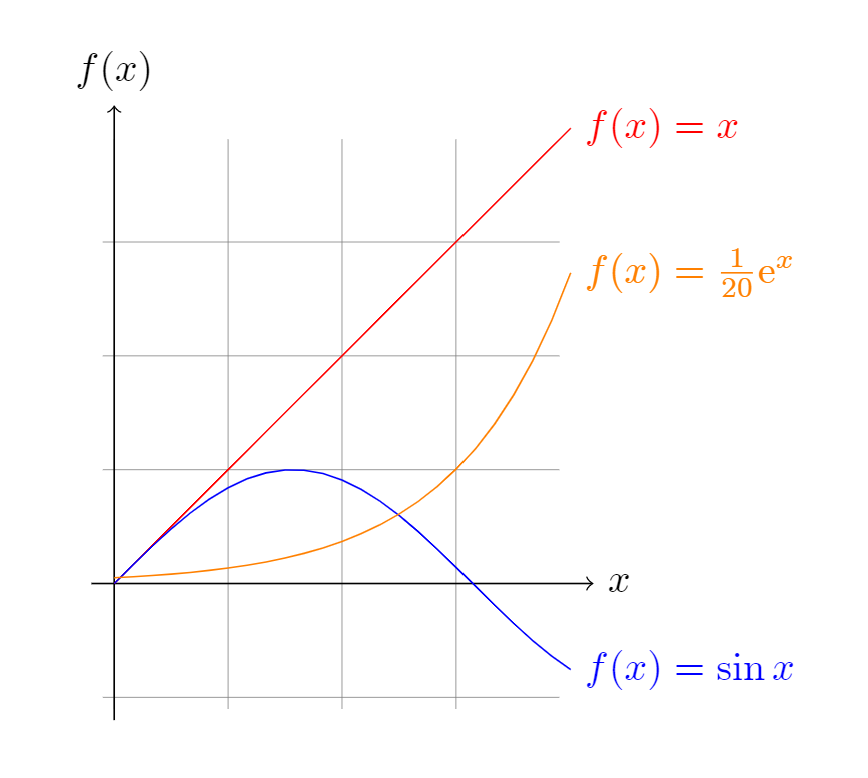
### 1. Minimal TikZ Diagram (Snippet Mode)
No document boilerplate needed!
````latex
```tikz
\begin{tikzpicture}[domain=0:4]
\draw[very thin,color=gray] (-0.1,-1.1) grid (3.9,3.9);
\draw[->] (-0.2,0) -- (4.2,0) node[right] {$x$};
\draw[->] (0,-1.2) -- (0,4.2) node[above] {$f(x)$};
\draw[color=red] plot (\x,\x) node[right] {$f(x) =x$};
\draw[color=blue] plot (\x,{sin(\x r)}) node[right] {$f(x) = \sin x$};
\draw[color=orange] plot (\x,{0.05*exp(\x)}) node[right] {$f(x) = \frac{1}{20} \mathrm e^x$};
\end{tikzpicture}
```
````
 ---
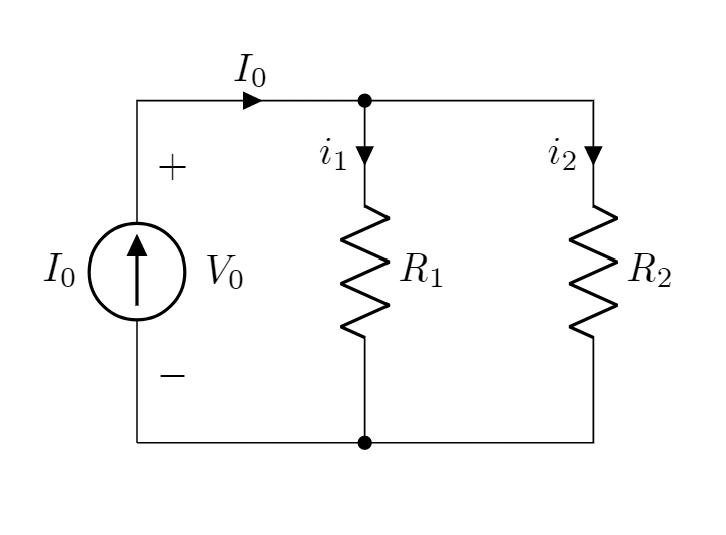
### 2. Electronic Circuits (`circuitikz`)
````latex
```tikz
\usepackage{circuitikz}
\begin{document}
\begin{circuitikz}[american, voltage shift=0.5]
\draw (0,0)
to[isource, l=$I_0$, v=$V_0$] (0,3)
to[short, -*, i=$I_0$] (2,3)
to[R=$R_1$, i>_=$i_1$] (2,0) -- (0,0);
\draw (2,3) -- (4,3)
to[R=$R_2$, i>_=$i_2$] (4,0)
to[short, -*] (2,0);
\end{circuitikz}
\end{document}
```
````
---
### 2. Electronic Circuits (`circuitikz`)
````latex
```tikz
\usepackage{circuitikz}
\begin{document}
\begin{circuitikz}[american, voltage shift=0.5]
\draw (0,0)
to[isource, l=$I_0$, v=$V_0$] (0,3)
to[short, -*, i=$I_0$] (2,3)
to[R=$R_1$, i>_=$i_1$] (2,0) -- (0,0);
\draw (2,3) -- (4,3)
to[R=$R_2$, i>_=$i_2$] (4,0)
to[short, -*] (2,0);
\end{circuitikz}
\end{document}
```
````
 ---
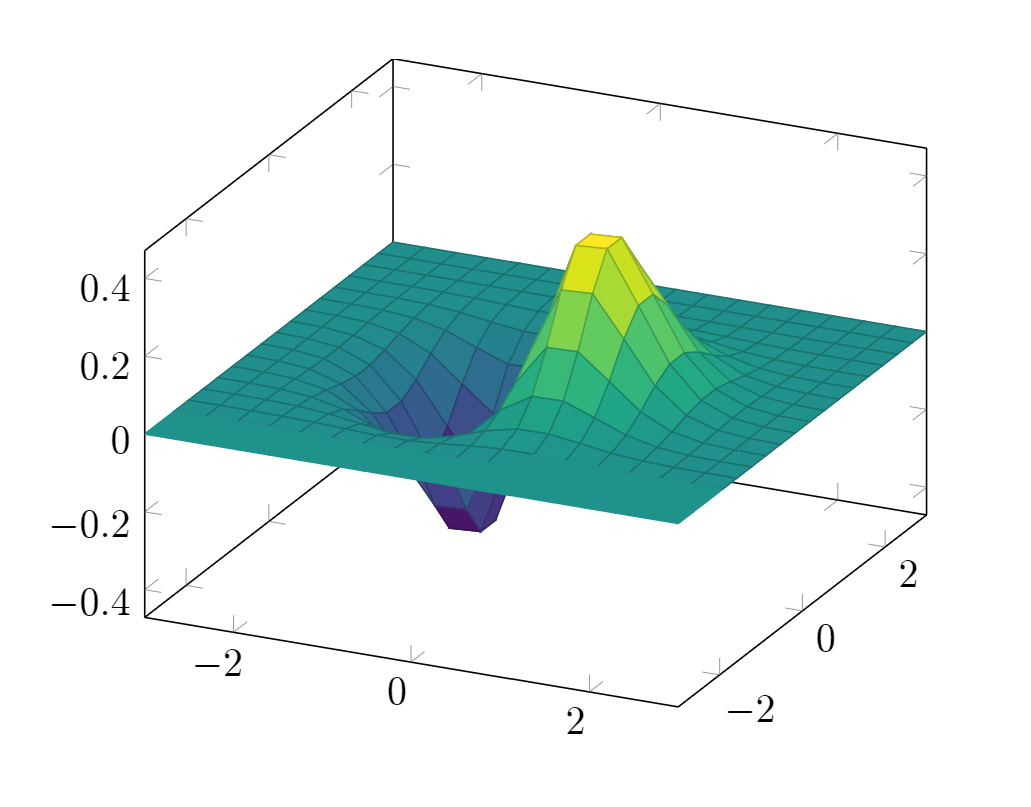
### 3. 3D Function Plots (`pgfplots`)
````latex
```tikz
\usepackage{pgfplots}
\pgfplotsset{compat=1.16}
\begin{document}
\begin{tikzpicture}
\begin{axis}[colormap/viridis]
\addplot3[surf, samples=18, domain=-3:3] {exp(-x^2-y^2)*x};
\end{axis}
\end{tikzpicture}
\end{document}
```
````
---
### 3. 3D Function Plots (`pgfplots`)
````latex
```tikz
\usepackage{pgfplots}
\pgfplotsset{compat=1.16}
\begin{document}
\begin{tikzpicture}
\begin{axis}[colormap/viridis]
\addplot3[surf, samples=18, domain=-3:3] {exp(-x^2-y^2)*x};
\end{axis}
\end{tikzpicture}
\end{document}
```
````
 ---
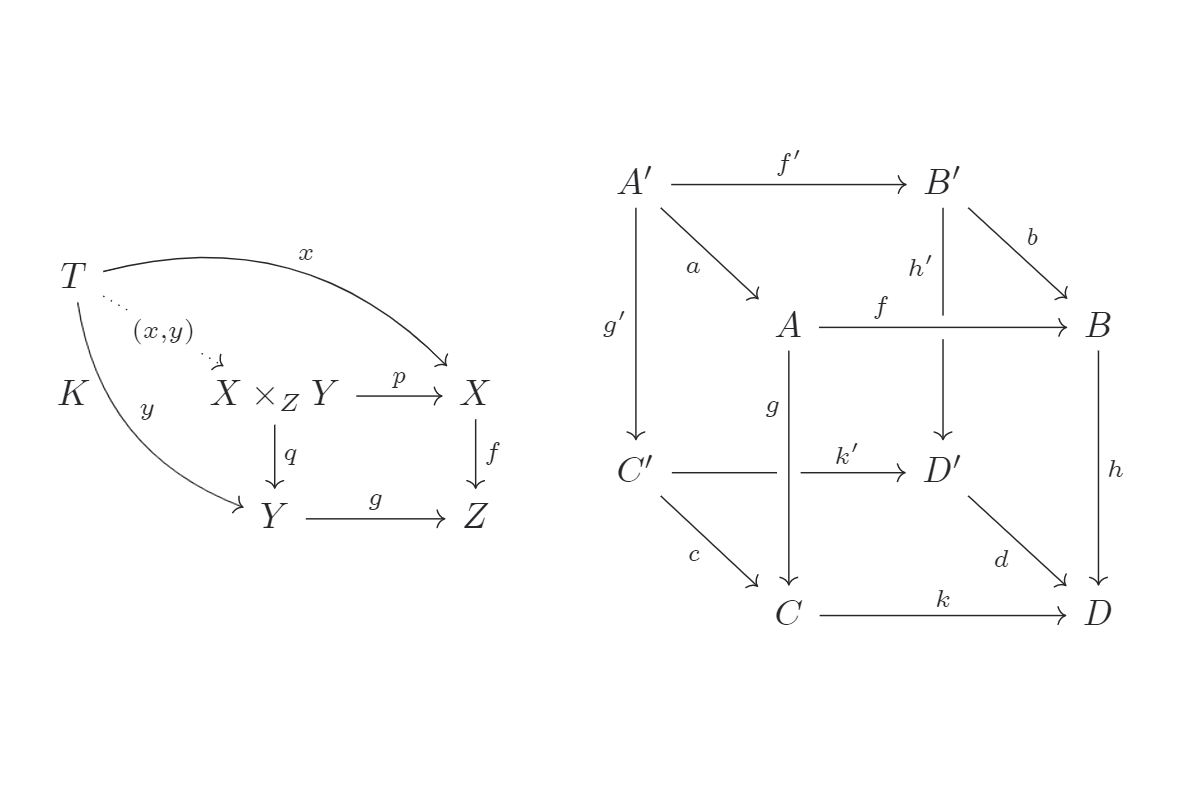
### 4. Commutative Diagrams (`tikz-cd`)
````latex
```tikz
\usepackage{tikz-cd}
\begin{document}
\begin{tikzcd}
T \arrow[drr, bend left, "x"] \arrow[ddr, bend right, "y"] \arrow[dr, dotted, "{(x,y)}" description] & & \\
K & X \times_Z Y \arrow[r, "p"] \arrow[d, "q"] & X \arrow[d, "f"] \\
& Y \arrow[r, "g"] & Z
\end{tikzcd}
\end{document}
```
````
---
### 4. Commutative Diagrams (`tikz-cd`)
````latex
```tikz
\usepackage{tikz-cd}
\begin{document}
\begin{tikzcd}
T \arrow[drr, bend left, "x"] \arrow[ddr, bend right, "y"] \arrow[dr, dotted, "{(x,y)}" description] & & \\
K & X \times_Z Y \arrow[r, "p"] \arrow[d, "q"] & X \arrow[d, "f"] \\
& Y \arrow[r, "g"] & Z
\end{tikzcd}
\end{document}
```
````
 ---
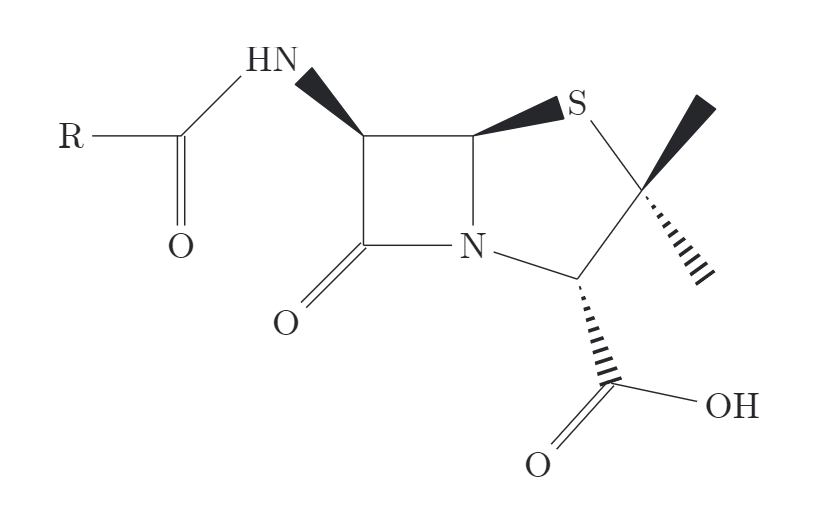
### 5. Chemical Structures (`chemfig`)
````latex
```tikz
\usepackage{chemfig}
\begin{document}
\chemfig{[:-90]HN(-[::-45](-[::-45]R)=[::+45]O)>[::+45]*4(-(=O)-N*5(-(<:(=[::-60]O)-[::+60]OH)-(<[::+0])(<:[::-108])-S>)--)}
\end{document}
```
````
---
### 5. Chemical Structures (`chemfig`)
````latex
```tikz
\usepackage{chemfig}
\begin{document}
\chemfig{[:-90]HN(-[::-45](-[::-45]R)=[::+45]O)>[::+45]*4(-(=O)-N*5(-(<:(=[::-60]O)-[::+60]OH)-(<[::+0])(<:[::-108])-S>)--)}
\end{document}
```
````
 ---
## 🔧 Troubleshooting
### Windows: "MiKTeX session could not be initialized"
If you encounter a MiKTeX session initialization error on Windows, register the MiKTeX DLLs manually in an Administrator Command Prompt (adjust version if different):
```cmd
cd %LOCALAPPDATA%\Programs\MiKTeX\miktex\bin\x64
regsvr32 MiKTeX240400-core-PS.dll
regsvr32 MiKTeX240400-core.dll
regsvr32 MiKTeX240400-packagemanager.dll
regsvr32 MiKTeX240400-packagemanager-PS.dll
```
### Executable not found in PATH
If the "Test Toolchain" button reports that `latex` or `dvisvgm` cannot be found:
- Provide the full absolute path in the plugin settings (e.g. `C:\Program Files\MiKTeX\miktex\bin\x64\latex.exe` or `/Library/TeX/texbin/latex`).
- Ensure the directory containing your TeX executables is in your system's environment `PATH`.
---
## 🔒 Security & Desktop Architecture
This plugin is configured as desktop-only (`"isDesktopOnly": true`) because it relies on your local TeX distribution:
- **Process Execution (`child_process.execFile`)**: The plugin executes your locally installed LaTeX compiler and `dvisvgm`. Commands are invoked strictly via `execFile` with segregated argument arrays (no shell interpolation), protecting against shell injection.
- **Filesystem Access (`fs/promises`)**: Temporary `.tex`, `.dvi`/`.xdv`/`.pdf`, and `.svg` files are created exclusively inside an isolated temporary directory within your system's `tmpdir()` (e.g. `tmpdir()/tikz-XXXXXX`). This directory is deleted in a `finally` block immediately after conversion.
- **Offline & Private**: The plugin performs zero external network calls and executes no dynamic script tags. Diagram source code is rendered locally on your machine and cached within local browser IndexedDB.
---
## 📄 License & Acknowledgements
- Licensed under the [MIT License](LICENSE.md).
- Forked from the [Obsidian TikZJax plugin](https://github.com/artisticat1/obsidian-tikzjax) by [@artisticat1](https://github.com/artisticat1).
- Inspired by the [TikZJax](https://github.com/kisonecat/tikzjax) project by [@kisonecat](https://github.com/kisonecat).
---
## 🔧 Troubleshooting
### Windows: "MiKTeX session could not be initialized"
If you encounter a MiKTeX session initialization error on Windows, register the MiKTeX DLLs manually in an Administrator Command Prompt (adjust version if different):
```cmd
cd %LOCALAPPDATA%\Programs\MiKTeX\miktex\bin\x64
regsvr32 MiKTeX240400-core-PS.dll
regsvr32 MiKTeX240400-core.dll
regsvr32 MiKTeX240400-packagemanager.dll
regsvr32 MiKTeX240400-packagemanager-PS.dll
```
### Executable not found in PATH
If the "Test Toolchain" button reports that `latex` or `dvisvgm` cannot be found:
- Provide the full absolute path in the plugin settings (e.g. `C:\Program Files\MiKTeX\miktex\bin\x64\latex.exe` or `/Library/TeX/texbin/latex`).
- Ensure the directory containing your TeX executables is in your system's environment `PATH`.
---
## 🔒 Security & Desktop Architecture
This plugin is configured as desktop-only (`"isDesktopOnly": true`) because it relies on your local TeX distribution:
- **Process Execution (`child_process.execFile`)**: The plugin executes your locally installed LaTeX compiler and `dvisvgm`. Commands are invoked strictly via `execFile` with segregated argument arrays (no shell interpolation), protecting against shell injection.
- **Filesystem Access (`fs/promises`)**: Temporary `.tex`, `.dvi`/`.xdv`/`.pdf`, and `.svg` files are created exclusively inside an isolated temporary directory within your system's `tmpdir()` (e.g. `tmpdir()/tikz-XXXXXX`). This directory is deleted in a `finally` block immediately after conversion.
- **Offline & Private**: The plugin performs zero external network calls and executes no dynamic script tags. Diagram source code is rendered locally on your machine and cached within local browser IndexedDB.
---
## 📄 License & Acknowledgements
- Licensed under the [MIT License](LICENSE.md).
- Forked from the [Obsidian TikZJax plugin](https://github.com/artisticat1/obsidian-tikzjax) by [@artisticat1](https://github.com/artisticat1).
- Inspired by the [TikZJax](https://github.com/kisonecat/tikzjax) project by [@kisonecat](https://github.com/kisonecat).